This is one of those Shut up and Take my Money Product announcement.
~20% Increase in IPC, ~10% Increase in Boost Clock Speed. It doesn't matter how Intel spin it, single thread performance will no longer be an Intel only selling point. 32MB L3 Cache is going to be very useful for certain types of Application.
Some of these were rumoured for quite some time. But having it confirmed is a completely different matter. And the pricing is still very good compared to what we used to get from Intel.
My only concern is stock availability. And not just at launch but over its life time. AMD has been very conservative with their production estimate. ( Again It is not TSMC's fault ) It wasn't long ago they were on the verge of bankruptcy, so it is understandable but at the same time I wish they took a little more risk.
It is also interesting there is no mention of EPYC 3. I am quite concern about their lack of progress in the Enterprise / Server segment.
Isn't this how it's always been? New tech shows up in enthusiast/consumer segment first, bugs are ironed out, manufacturing ramps up & yields go up, then new server parts are announced?
Besides, isn't EPYC2 the best server CPU already? There's no time pressure on AMD, they're comfortably in the lead.
Regular EPYC CPUs have too high a TDP for smaller server installations, such as so-called edge servers. EPYC Embedded is still stuck on Zen 1. Intel hasn't upgraded their comparable line of mid-range server CPUs (e.g. Xeon D line), either, but AMD won't win on performance alone. Intel has a huge SKU lineup, muchmore volume, and a muchricher vendor and platform ecosystem. If the vendor demand isn't there to push AMD on EPYC Embedded, Ryzen Emedded, and other market segments, AMD should build demand, otherwise they'll just recapitulate their rise & fall during the 2000s.
Cloudflare recently announced that they would be building out some data centers with EPYC CPUs. Do you believe that the situation has changed since February? They did a pretty exhaustive analysis [0] of price, performance, and power where they saw an advantage in switching away from Intel for that generation at least.
If the existing server hardware is already in a decent spot, then maybe they need to spend more resources on sales rather than making changes to keep it cutting edge.
I think Cloudflare is a different kind of "edge" service than what EPYC Embedded targets, and I would think Cloudflare uses regular EPYC chips. The "edge" that EPYC Embedded, Xeon D, etc target is, I think, more about the hardware configurations (smaller enclosures, minimal number of drives and other devices) and the type of facility (usually not a colocation facility, so power and heat are of significantly more concern). But the workloads are still very much server-class.
EPYC Embedded chips are competitive with Intel's offerings (Xeon D, etc), but as I said Intel's ecosystem is richer--for example, more, better motherboards. It's not enough that AMD's chips are competitive with Intel's. AMD has a huge ecosystem handicap, and so either they need to improve the ecosystem or sell chips that are dramatically better than Intel's, and for EPYC Embedded neither is the case. Long term a better ecosystem is necessary for AMD to survive because a broader product and customer base brings consistent income and mindshare--staying power. I would hope and assume AMD is working closely with cloud vendors on their proprietary hardware, but the results are opaque; judging by traditional channels (Supermicro, etc), AMD hasn't even begun to close the gap.
I don’t think survival is at stake. AMD powers both XBox and PlayStation for the second generation in a row and that ought to help keeping them alive. It’s more a matter of whether they can capture enough of the market so they’re not merely “surviving”.
Fair enough. Survive was a poor choice. What I had in mind was surviving as a contender at the high-end, so we can continue to benefit from competition for server-class chips. Alpha, SPARC, and POWER all lost the high-end market (their only market) to Intel at a time when Intel was inferior. AMD previously failed because Intel surpassed them, but that's because AMD couldn't leverage their initial advantage to secure their markets and thus their ability to keep investing. Without volume and mindshare failure is inevitable. Providing the best high-end chips is insufficient to remain competitive long-term. The reasons for previous failures were complex (ISA, operating system, sales channels, etc), but ultimately it comes down to something like diversity--customer and product diversity provide buffers in terms of sales as well as changes in market direction. AMD's chips are indisputably better than Intel's right now, but even with Intel's mindboggingly massive fumbles they're barely sweating in terms of current and prospective revenue.
> Alpha, SPARC, and POWER all lost the high-end market (their only market) to Intel at a time when Intel was inferior
What's interesting is that the industry was so sure that Itanium / Windows NT was going to crush everything that many of them just gave up. Compaq and Silicon Graphics specifically tired to switch to Itainium, which was years late and never a huge success. They probably could have gotten another generation or two in. Might have saved SGI.
> Providing the best high-end chips is insufficient to remain competitive long-term
Reason Alpha SPARC and POWER failed was they did not support the de facto standard X86 instruction-set, I believe. So the fastest most power efficient chip is not enough unless it can also run the most common software
In this case "most common software" meant proprietary and nonportable operating systems and applications.
Would you buy a server that will run the software you want to use either never (Windows and Windows applications developed on Windows) or maybe, eventually, as long as the new platform is a success (only slightly more portable proprietary Unix variants)?
Maybe it is different this time because well for one Intel and AMD are on the same architecture
but more importantly for arm or other platform, maybe this time is different because the servers mostly run on open source software. Given the potential revenue, I'd imagine it should be pretty straightforward to port common server software to any architecture if it isn't already?
With the kind of marketshare ryzen has gotten on custom builds plus several % increase in server( which has large margins) I don't think amd has financial issues right now. They'll probably target gpus next, go for the low hanging fruit and then slowly iterate on the rest of their products.
ARM just needs to be a little bit more competitive on performance per watt and a few other metrics...I think when Apple inevitably either proves ARM can be a very powerful platform via their migration to complete ARM based computing, we'll see a lot more movement and investment here, I'd say ~5 years is a good timeframe to start seeing serious long term shifts to ARM. If Apple fails to do this within that time frame, I think that may push it out longer. They're already pushing the limits of ARM as a platform with their custom chipsets
I think nvidia's long term strategy is going to be built around this, among other things, otherwise I believe they overpaid for ARM holdings. They'll need to make sure they can expand the market for ARM CPUs to drive ever more GPU sales in the future. They haven't been as successful getting their embedded GPUs into the ARM market if I recall correctly
A huge sku lineup according to every marketing book every made is a terrible idea here. I hope they don't view it as a strength. I'd be slashing like hell.
It's not a given at all, even if that's common. As a fresh counter-example, Nvidia released Ampere on TSMC 7nm for the enterprise many months before they released chips of the same architecture for consumer devices on Samsung's cheaper and significantly less dense 8nm node.
AVX512 is garbage. It incurs a massive performance hit from both frequency and mode-switching penalties. Apart from a few niche HPC and ML applications which you'll never encounter, AVX512's most compelling use cases are to drive Intel's shady market fragmentation, and to create more bullshit FP benchmarks that Intel can claim to win.
Now that we've covered both ends of hyperbole, it's maybe worth noting that a lot of CPU parallel tasks can be well accelerated by ISPC, which can make reasonably effective use of AVX512 (with the aforementioned clock speed caveat): https://www.mail-archive.com/ispc-users@googlegroups.com/msg...
Also, AVX512 is a much nicer (orthogonal) ISA than SSE or AVX2.
While there are some niche applications that need larger amounts of memory than GPUs can offer, it's worth noting that this speedup comes from making the CPU act more like a GPU, and they aren't as fast as GPUs acting like GPUs (which are essentially many 32-wide vector units, rather than AVX512's 16-wide).
Which applications, and why? Some computational ones will go significantly slower on the same number of cores if they could have kept avx512 fed (perhaps small data in cache), but most don't spend all their time in something like GEMM. The new UK "tier 1" HPC system is all EPYC.
Automatic vectorization for AVX512 would work on the simplest of cases and using intrinsics or writing inline assembly is beyond the scope of 99% of software projects.
There's a very small set of applications where the precision of AVX512, but more cores also speeds them up.
A much more important set of applications is those sped up with GPUs or other ML accelerators. Notably the high performance of these CPUs is useful with those too, because they are great at data pipeline crunching prior to the GPU part.
I just upgraded an Athlon64 x2 to a Phenom II x4 because I could get the chip for $20 and a cooler for $30. Heck of a speed boost on that box, which was looking a little long in the tooth otherwise.
It's now beefy enough to run a modern OS and GUI and even do some light gaming on, but the mobo has serial and parallel and PATA and floppy ports so it serves as my media archiving mule too.
I ran a Phenom II x4 DDR2 until this summer when I bought a Ryzen 3700X. It could not play Battlefield, Rainbow Six Siege, Squad, Far Cry, Pubg ( could almost play, loading stream time was the killer), Mordhau and the likes, but it could play a lot of games, so many that I didn't need to upgrade, it was the computer as a whole that was giving up.
I could play Wargame Red Dragon, Dark Souls 3, Dota2, Dishonored 2, Remnant from the ashes, Warhammer 1 total war, Disco Elysium, Dragon Age Inquisition, Fallout 3 New Vegas.
I'm still running an Ath 64 x2 6000+ for a web server, I think it's from about 2006. That with an old hard drive are running 120W, which would be nice to hack down.
I don't remember if I jumped straight to this from my Pentium Pro 200, but the role of this box started with that one.
Yeah I had one of those. It was great but so noisy.
Then Core2, then i5. I built my son a computer last year on Ryzen and it's great, but I don't see myself upgrading my i5 for a couple of years. My money will go on GPU upgrades (currently a 1070) instead I think.
My Athlon is in a case next to my left knee. I was almost scared off by the Intel hyper but not too sure of AMD spin. We're all casualties of marketing departments. In the end I bought AMD because it was cheaper than Intel.
> 32MB L3 Cache is going to be very useful for certain types of Application.
"Going to be"? The Ryzen 3600 ($199) and above already have 32MB L3 cache, the 3900X ($499) and above already have 64MB. The big L3 cache is already a big selling point of Zen 2.
The difference they talked about is it is now uniform latency instead of split into two blocks of 16MB accessible at different latencies depending on which group of four cores you are on.
Yeah but it's not as relevant to the discussion given it's in a different class of CPU not really aimed at average consumers. It's fair to mention it, though.
But only 16MB of L3 is accessible to each core in Zen 2 - no single core can utilize all 256MB of L3 cache. That's why Zen 3 cores being able to access the full 32MB of L3 cache that's on die is a big deal.
General rule of thumb is that bigger caches are slower to access.
If AMD have traded a bit of access latency for their larger cache, then theoretically there will be a memory heavy application with a working set that fits in 16MB that will see a preformance hit.
Though, we don't know Zen 2 was running into area based speed limitations for it's L3 cache. It's entirely possible Zen 3's cache runs at the same speed.
A larger but slower cache would be a downside for an application that did not need the extra capacity. Now it's cache accesses are slower with no gains anywhere else.
Of course if you don't have enough memory at a given tier and are overflowing in to the next adding more will always make things better, but once you hit that point adding more just adds cost at best and might actually make things worse if it's slower for the extra capacity.
There are a bunch of downsides to large caches. Everything from access time to chip layout to latency and even power consumption. Everything cant be cache and be awesome.. :P
Having more cache can potentially lower the speed of the cache, as the access time is limited by the time the longest path takes, the propagation delay.
So there's a tradeoff between cache size and cache speed, which is why there are separate L1, L2, and L3 caches of various sizes. So potentially the L3 cache in this architecture could be slower than the L3 cache in the 3000 series. It could also be the same speed if the size was limited for other reasons, such as yield.
While this is true, in practice for the vast majority of applications this is a good tradeoff since the relative slowdown of L3 cache vs. the improvements in reductions of cache misses ends up being tiny:huge.
I'd expect the workloads that could suffer (all else equal) would be something like SIMD optimized matrix multiply where you're always able to prefetch the elements needed into cache effectively and memory access tends to be sequential. But those slight losses would likely be dwarfed by the improved core clocks, etc.
AMD claims a significant improvement in memory latency though, which is concordant with their large gains in gaming workloads (a 20 % general-purpose-throughput-oriented IPC increase alone would never give you a 20 % FPS increase in games).
A larger cache size would improve memory latency assuming the working set can utilize the full 36mb, which I'm sure the 2 games that had a 20% uplift can.
It's purely speculation but I suspect the cache size was limited by yield concerns rather than timing constraints. It looks like the 5600X has 1mb less cache so they probably engineered a way to disable faulty sections of the cache on a 1mb granularity.
Edit: My speculation's wrong. The cache difference between the 5700X and the 5600X is due to core count differences. It's the sum of the various cache sizes, and I misread the slide.
> a 20 % general-purpose-throughput-oriented IPC increase alone would never give you a 20 % FPS increase in games
Is this true even for games that are CPU-bound? When I play MS Flight Simulator, enable the Dev toolbar, and look at the framerate monitor, it tells me that it's spending 20 ms of CPU time per frame, which causes my framerate to cap at 50 fps. A 20% increase in IPC would theoretically bring the frame time to 16.67 ms, giving me a cap of 60 fps.
isn't the difference between L1, L2 and L3 also because of the functionality, not just the size+speed? L1 is data and code. L2 is data only, per core. L3 is data, synchronized between cores.
Yeah, technically there are 2 L1 caches; x86 is a 'Modified Harvard' architecture. The instruction cache also typically has to deal with caching micro-ops. I believe L2 and beyond store both instructions and data. There's also cache associativity, where the the same location in memory can be stores in one of N locations, which can differ per level. I think L1 caches are typically more associative because that takes extra silicon per byte. It looks like Zen 2 at least has an 8 way associative L1 cache.
With smaller caches and especially L1 you typically want higher associativity.
With 32KB L1 at 64B line size, you can only cache 512 lines. Grouping them in larger buckets means less spillage as hot lines randomly end up in the same bucket.
No? Other than the next best use of that silicon/heat budget, to whatever degree the latter is relevant for cache. But not afaik from an architectural point of view.
Not as such, but larger caches are slower (due to the speed of light) which can reduce performance. A few apps have seen performance regressions on Tiger Lake.
Exactly. All else being equal more memory is either neutral or better, but all else is not always equal. If the larger capacity memory is slower, then any applications that didn't need more memory just lost performance.
The performance is in the same ballpark for cost-performance as Intel 10th gen, and the 10th gen Intel platform will be compatible with Intel's 2021 chips, whereas if you get an AMD board now, this will be the last processor which it supports. The AMD boards are more expensive for comparable features. Intel 10th gen also has better all-core boosting, which might be important for upcoming games with better multicore support.
No, the top model of Rocket Lake will have only 8 cores & 16 threads.
Therefore, for multi-threaded tasks it will be much slower than Zen 3.
However, it is expected to have an IPC comparable with Ice Lake and Tiger Lake, so if it would reach 5.4 GHz, it might be a little faster than Zen 3 for single-threaded tasks and gaming.
Although everyone is saying that Intel is dead in single thread (which is definitely far more true than previously), I don't see 5.4GHz as infeasible for them - tenth gen goes up to 5.3GHz at the very high end and I would be surprised if they didn't reach at least 5.4GHz.
Looking historically, the 6700k reached 4.2GHz, the 7700k 4.5GHz, the 8700k 4.7GHz, the 9900k 5.0GHz, and the 10900k 5.3GHz - which would imply 5.5 or 5.6GHz for what will (presumably) be the 11900k.
Everyone here is missing the most important concept in semiconductor manufacturing: binning and yield [1]. They're interconnected.
It's not like Intel can make 5.4 GHz chips for days on. It doesn't work that way. Ofcourse they can manufacture processors capable of some ridiculous 6.0 GHz (not accounting for power consumption)... but that would be 0.1% yield. You cannot run a factory like this.
5960X would be a Threadripper part (at least based on the releases of the 3000-series Ryzen desktop processors). Threadripper has typically lagged the Ryzen announcement. I think we can expect some insane TR parts soon.
The fact that they made of point of supporting threadripper in their announcement gives me a certain level of confidence there will be Zen 3 thread rippers. I mainly say this because people were curious if the 3950X would mean the end of the threadripper line, which was of course later proven wrong when the 24, 32, and 64 core TR parts came out.
> 20 % IPC increase, 20 % higher perf/W on the same process, effectively double the cache size, and reduced memory latency. Absolute insanity from AMD.
An increase like this wasn't something unexpected from a generational update back in nineties.
But this is an architectural tweak on the same node. Zen2 was 7nm TSMC, while Zen3 is 7+nm TSMC.
TSMC must have optimized the heck out of their transistors to deliver such a large benefit. Or the AMD Zen 3 architecture really found some low-hanging fruit or something to grossly improve performance.
Plus 15% IPC and 10% more max boost, this checks out. I'd expect the 8-core part to have a higher multi-threading performance increase than the 12-core part, because it has just one CCX.
I think it's been neat from an architecture perspective for AMD. TSMC (and AMD) has had trouble matching the frequencies that Intel has been attaining on their 14 nm node, so the only way they were going to beat Intel's single threaded performance was to increase IPC enough over Intel that the frequency gap didn't matter. Seems like they finally got there (the point where their IPC is high enough that a 4 point something GHz Zen part can exceed the single threaded performance of a 5 point something GHz Intel part).
It seems to me that the current Ryzen 9 3900X has an insane value compared to the new generation. Sure, it's single core performance is lower by a meaningful amount. But I'd assume that the multi core performance is WAY better with its 12 cores compared to the 6/8 cores of the 5600X/5800X.
If you compare MSRP at launch to retail a year later, you're going to notice a big difference.
In the US, the Ryzen 9 3900X MSRP was $499 but is $70 less now. (Initially, supply was low, and it was selling over MSRP as high as ~$570.)
But they came with coolers... I have a Ryzen 2700X that I got for $230, and I still use the stock cooler. To jump to a Ryzen 5800X plus a cooler would be a huge expense. I will definitely be on the sidelines for the next six months, but then I'll revisit the pricing situation (once motherboard manufacturers release updated 400-series firmware.)
Sure, the prices of the new generation will fall over time.
But I still don't quite see how the multi core performance per $ of the new generation will be competitive compared to their previous generation. At least at the lower end, simply because you can buy more cores/threads for roughly the same money - although with a lower clock speed and single core performance.
However, I guess we will know more when meaningful benchmarks are released and this ends anyways when the remaining supply of 3900X is sold out.
The difference is that the 3000 series introduced 12 Core CPUs that weren't available before AND provided increased gaming performance.
This time around the major reason seems for upgrades to be single core performance - which I guess as they didn't really go into multi core performance. But we'll know more when the benchmarks come out, and discussion beforehand is pretty pointless.
The stock cooler on the 3900x is basically the same as the one on the 2700x. It reviewed well on the 2700x but the 3900x was too much for it if you cared about noise levels. So I wouldn't count the box cooler as a huge plus for the 3900x though a revised more capable version could have been for the 5900x
> Man the lack of a 5700x is really making it hard for me to not justify getting a 3700x on sale
Sounds like a win-win for AMD. Either they sell to customers that demand the best absolute performance, or they sell to customers that demand the best value. Since they offer products to meet both demands, they don't really care which type of customer you are.
Zen 2 is still a fantastic processor, and it will certainly be more affordable than Zen 3 for the immediate future.
Anecdotally, all of the PC gamers I know put aftermarket coolers on their CPUs. The box cooler is still in the box taking up space in their closet. The AMD parts especially benefit from additional cooling (higher turbo clocks). I think it makes sense to not include box coolers on parts so high up the performance chart that using a box cooler would just hamstring it.
FWIW I just upgraded from an Intel 4790K to an AMD 3900X and while I had a big Hyper212 cooler on the Intel at the moment I'm running the bundled stock cooler on the AMD.
I understand why they're doing it and I don't disagree with the logic that most of the DIY market at that level is going to use an aftermarket cooler one way or another, but it was nice to not have to worry about it off the bat.
Seems to be a mix. My two friends that game built systems with Zen+/Zen 2 systems and stuck with the stock cooler, as have I (though I do not game as much... I do hear it ramp up a bit during compilation.) My clocks are typically 4.2-4.3 Ghz on a Ryzen 7 2700X, so I don't think I'd benefit much from additional cooling.
My main problem with the AMD stock cooler isn't that they don't perform well, but that they are really noisy compared to most decent aftermarket coolers.
The thing to watch is then going to be the "5700X", i.e. the Zen3 version of the 3700X, which, if the analogy matches, should have 8 cores and a 65W TDP. It isn't in the initial slate but they left room for it in the numbering.
Well I hope they release the 5700X soon. I was excited for Zen 3, but their price bump and lack of a middle ground option left me conflicted whether I should shell out more money for a 5800X or get a last gen CPU.
What would be the 2 good die release? They've already announced the line-topping AM4 part that uses all the cores from the two dies. Isn't the next step up a four die part in a Threadripper packaging on a different socket with some cores disabled?
That 5950X (and its predecessor) seem like voodoo with the core count, clock frequency, and TDP (yes, I know TDP is a flawed, flawed number - it's still impressive).
TDP is about as meaningful on CPUs now as nm is in fab tech.
In practice the 3950x pulled up to ~225w running maxxed out avx2 workloads, ~300w if you overclocked it. The 3900x pulls up to ~190 watts at stock boosts. Both are called "105w TDP" parts.
This is incorrect, to the best of my knowledge. 3900X and 3950X both have a 142W package power limit (PPT, 35% above TDP) at stock, with a properly working motherboard. As I understand it, not even short boosts are allowed to use more power than the PPT.
The limit can be lifted in the BIOS (or e.g. Ryzen Master) but that would no longer be stock operation. And there was a defect in the initial BIOS of ASRock X570 and maybe other motherboards, which broke PPT but that was running the CPU out of spec, not stock operation.
If you're going to attack the "spec" that is TDP, you may as well do it correctly. None of the scenarios you mentioned align with what TDP is supposed to "measure". Even if TDP weren't the flawed measure it is, you still wouldn't be critiquing it by noting the measures you have.
I disagree. If TDP wasn't so flawed as to be completely meaningless, that critique would probably be valid.
The definition AMD uses is absolute nonsense, given how much the θca values differ from model to model. If they fudged any harder the higher end CPUs would start having "TDP" lower than the weak CPUs.
I second this reaction. Historically, clock speeds scaled inversely with the # of cores. Seems like the efficiency is overtaking other constraints at this point.
The achievable all-core clock will inevitably scale inversely with # of cores, in practice. The advertised single core and all-core clocks are some combination of binning and pure marketing.
With most modern PC processors, both GPU and CPU, one of the primary limitations is thermal headroom. There are features and technologies with varying names across brands and processors that essentially do the same thing: run at the maximum clock that the current thermal situation will support.
From my personal experience, my Threadripper 3970X will happily maintain ~4.4GHz all-core (rated for 4.5GHz max single-core) so long as I can keep the temperature in or below the 70s, with no overclocking.[0] There are power limits as well, but rated performance numbers are within the power limits. Overclocking can put you past the marked power limits, and certainly needs ample cooling.
[0] Granted, I need to pump cold air into the case to maintain the temperature, but that's a limitation of my current thermal solution. At some point I'll probably upgrade to an excessive water cooling solution (:
That's an interesting piece of data and I'm glad you posted it. I also use a 3970X and can't get it to 4.4GHz even with all but one CCD disabled (much less all-core). I am on air cooling, though, and suspect that switching to water cooling would help a lot. I hit 90C almost instantly under load. (I use the automatic overclocking and can do 4.2GHz all core; much better than the specified 3.7GHz all core.)
Since I don't run into Threadripper owners very often, I'm wondering if yours also has a pretty high idle power? Mine idles at 80-90W (reported; 200+W from the wall) which is surprising to me coming from the Intel world. So much electricity wasted simply because I am too lazy to turn off my computer.
I have a hunch that I won the silicon lottery with it, though I haven't confirmed with any overclocking. I'm happy to dive deeper if you want. Below is a basic summary.
I have 5x140mm intake fans, with a Noctua NH-U14S TR4-SP3 cooler. That runs with push-pull 140mm fans, 2000RPM in/1500RPM out.
This reaches steady state within a few minutes under load. With an open case, it will clock down to ~4.2GHz after 5-10 minutes. With a closed case, that is faster. For fun, I ducted the A/C vent in the room into the case and cranked it. It stayed reliably up around 4.4GHz all core. Technically, I think it would reach a lower steady state clock/higher temp if I left it for days, as it does noticeably warm the room.
OK, that's really neat. I have almost the same setup except use 120mm fans on the NH-U14S (to clear the RAM, I populated all 8 slots ;)
I am very tempted to switch to water cooling. Seems like I could make it a little quieter, and get a little bit more performance. $1000 more performance? Probably not. But it would be a fun project.
(In general, I am blown away by the Threadripper's performance. I have C++ builds that took 15 minutes on my 6950X that now take 2!)
My fans are offset ever so slightly to account for RAM clearance, as I, too, have eight sticks. I think we basically built the same computer with a couple different choices (;
I lose millimeters of fan coverage (I have millimeters of fan peeking over the top of the tower), but I opted for this, since I get more airflow over the width of the cooler. The effect is probably measurable in single-digit percentage differences in a highly controlled test.
The big thing for me was the case airflow. That thing throws off so much heat that my case ambient temperature was growing to be 10C or more above the room ambient. Hence the 5x140mm intakes. The back of that machine is a nice heater when I'm crunching anything big.
My goal is to keep those fans, but attached to radiators. I think 5x140mm of radiator should give me much better heat transfer.
I have a 3960X on Gigabyte Aorus Master with an RX480, 1080 Ti, X520 NIC, 3x SSDs, and my total-system idle on Linux is 180–210 W. I do agree that the high idle is frustrating, as it dumps a lot of heat into the room.
Got a few of these and water absolutely make a huge difference. Open air chassis with a large radiators I intended to cool video cards with... not that one can be found right now. Enclosures were turning mine into an easybake. Surfing at 46C, mid 60s pushing it hard. The dust bunnies can get ugly, however.
Yeah, you don't want to hit 90 degrees on Zen. Unlike many other CPUs, max stable frequency on Zen clearly decreases with high temps. Time to build a water loop :)
re: idle, you do have pstates enabled, right? ("Cool'n'Quiet") firmware likes to disable it when you overclock in the setup screen, have to turn it back on
I can get much more surface area of radiator than can reasonably be reached by the heat pipes on an air cooler. There are limits to how many radiators you can effectively leverage in a cooling loop.
Additionally, a loop with a large volume of liquid offers much more thermal buffer before reaching a steady state temperature.
Most air coolers will be heat saturated within a minute or so. A water cooling loop may maintain lower temperature for minutes to tens of minutes. So even with two solutions that otherwise reach the same steady state temperatures (and therefore throttle equally), you may see better real world performance out of the water cooling solution.
I'll note, I would be building an open loop, not using an AIO/closed loop cooler. My case has room for 7x140mm of radiator in a couple of configurations. I would probably use 5x of that in one 420mm radiator and a 280mm radiator. This should offer much more cooling capacity than any tower cooler.
Watercooling has one benefit: The heat capacity* of all those water is amazing.
*Heat capacity = how many joules of energy the whole system takes to raise the system's temperature by 1C.
So, the CPU is generating x Watts of heat = x Joules of heat energy per second. Watercooling can absorb a LOT of Joules before the cooling system's temperature increases, thus helping in keeping the CPU away from its MaxTemp.
Plus when attached to a sizable radiator, watercooling system can release all those energy to the environment faster, thus reducing the effective energy absorbed by the system.
I can only offer anecdata, but I built a Ryzen 3600 based desktop earlier in the year.
Initially I used the stock cooler, but it idled at ~45C, and the moment I did anything approaching a load it immediately shot to 90C. This was in a room with ambient at around 23C.
After getting annoyed for a while I swapped for an AIO Liquid cooler and hey-presto it now idles at 30C and when maxed out - 75C.
That's not really a good air vs water comparison. You'd have gotten similar results if you swapped for a better tower cooler as well. The stock coolers are basically built to cover base clock and a bit of turbo.
Yeah with a CoolerMaster Hyper 212 and a single fan I get idle of 40-45 and a high of 76 and I tend to run with fans set to be mostly silent. With a bit of a noisier experience I seem to recall idle was under 40.
That is all OK, but remember that Zen 2 really tries hard to hit 90C. Especially if you go into Ryzen Master and turn on Automatic Overclocking (very conservative overclocking by enthusiast standards), and your motherboard doesn't have power delivery limitations, the CPU's main goal is to try to hit 90C under load. It will automatically adjust frequency and core voltage up until it hits a thermal limit; by taking more heat away from the CPU with better cooling, you end up with better performance because the CPU will try to automatically give you the best performance that your thermal solution can deliver. AMD didn't document any of this very well (lots of confusion between Precision Boost 2 and Precision Boost Overdrive), but the technology is very impressive.
I guess what I'm saying is that you might be interested in exploring some of these options in Ryzen Master. You have some thermal headroom, so if your motherboard has good power delivery, you can max out the power limits and boost clock limits, and probably squeeze out a little extra performance. Power (and therefore heat) is going to scale quadratically with core voltage, and frequency is going to scale less than linearly with voltage, so you might not see much gain (and might prefer not spinning your fans up to full speed under load). But, it's an option that's available if that sort of thing interests you.
I got about 6% more real-world speed out of my Threadripper 3970X by switching from OC off to Automatic Overclocking; with air cooling. AMD's technology here is pretty impressive.
Maybe not the voodoo you are thinking about but on the GPU side, the 3Dfx Voodoo was indeed a groundbreaking 3D accelerator card.
At the time, 3Dfx main competitors were Nvidia and ATI, Nvidia finally bought 3Dfx and AMD bought ATI. So technically, voodoo is on the side of AMD's competition.
This actually pave way for 32 Core Threadripper that could simply be double 5950X with 4.9Ghz all within 280W TDP.
For me having 32 Core and high Clock speed is the sweet spot for Workstation type workload. Leaving the 64 Core with lower boost due to TDP limitation are better for Server.
That cinebench score is about 6% higher than the highest score on Anandtech, which is an Intel laptop part. Not sure which I will consider more vaporware.
I've just upgraded my Notebook to an HP EliteBook 835 G7, which is a 13" Notebook with a Ryzen 7 4750U. I've decked it out with 64GB Ram and a 2TB SSD. 8 Cores, 16 threads, boosting to 4,1ghz, 3 outputs capable of 4k 60hz, (2* dp over usb-c, 1 hdmi 2.0), 2 full size USB A Ports... and a lot more goodies all packed in a very supremely built chassis.
I couldn't want for more, (ok Thunderbolt, but that's not as valuable as everything else).
I'm VERY happy with it's performance and couldn't be more grateful that AMD is providing much needed competition in the CPU market, I wouldn't have gotten a machine this powerful at this size otherwise.
So yeah, i'll upgrade my Desktop to Ryzen 5950 once I get the opportunity, even if it's just to hold more fire below Intel's feet.
Where did you buy it from? I'm in the market for a 13" laptop with 32GB of ram and a ryzen CPU, with no hardware that's not Linux-friendly. So this sounds like a close fit.
But I can't even find the Elitebook 835 on HP's website, or on Amazon.
I ordered from a small notebook dealer in my area (notebook.de) that offer to upgrade the devices if you ask for it. I was looking for weeks for this special model as it was the first 13" model with the right ports that offered 2 so-dimm slots, so I emailed them about it before it was listed to be among the first to receive it.
Funnily enough HP in their own specsheet made the mistake of declaring it as only supporting 32GB which then lead to me having to very forcefully demand them to just order the memory at my risk and install it anyway.
Of course it works beautifully.
What I've yet to find is anything similar that also has a more than a 1080p screen. Frustratingly the Lenovo T14/T14s in Intel spec does have a 4K screen.
Yup. Usually no hi-DPI and never DCI-P3 or Adobe RGB gamut coverage. The chips have great performance for rendering, but you can't get wider gamut colors to see it.
I got this 4750U in the T14. The CPU performance is great, but the iGPU is terrible when connected to an external 2160p60 screen. Animations for stuff like maximizing window have 2-3fps tops. iGPU from intel in 10510U manages 10+ fps. (5.8 kernel, Gnome 3.36).
This must be a software issue in Linux, I don't have anything close to these problems in Windows. Perfectly fluid with 2 external 2160p60 screens connected.
In 2017 I decided to build a gaming PC. I had been out of the PC Gaming world for a while, so I watched some youtubers to see what I should buy. Ryzen first gen had just come out, and Linus Tech Tips was pretty pro AMD. Seemed pretty optimistic.
I bought a Ryzen 1700, and checked the AMD stock price. It was ~$10.
I told all my friends to buy AMD stock.
I had never purchased stocks before, but I was pretty sure that AMD was going to go up. I bought $500 worth of AMD stock at $12. (it took a few months for me to get around to buying it)
As 2018 went on, financial market started to pay attention to AMD. People were calling it a buy at ~30$.
I was pretty sure that everyone else had missed the boat and that I was in the money solely because of Linus Tech Tips.
I bought 3dfx stock in the late nineties for a similar reason. It went to zero. My recommendation would be to sell some of your stock to lock in a little bit of profit and then you can let the rest ride and it'll affect you less emotionally.
Had the same exact thought and problem. Only that I bought AMD "fake" demo stock in my bank account on that same day just for fun. So know I can see exactly how much I could have made if I only would have bothered to get my real account to work that day..
If such a big company is priced so low it may signal an opportunity. It is similar with GE now. But there is always the risk of its price continuing down. AMD could have failed to deliver better products and continued to struggle. You won the bet, congrats, but don't think you will be so lucky with other stocks. And don't forget to actually sell the AMD to realize profits at some point. Unrealized profit is, well, unrealized.
I never recommend friends and family to buy a specific stock.
This is a good way to loose friends. I am happy to share with them what I am buying though, if they ask
You got lucky and this would have been ill advised.
Congratulations on your bet though!
You should always look at how much something impacts revenues. For example, a 5-minute look at GoPro's financials would show that the company's stock price would likely fall even if all police departments in the entire world had contracts for body cameras. So just because you like a product and can imagine that others will like a product doesn't mean it is translatable to the company's finances or common stock investors.
No. Putting $500 for stocks of a company that you believe in and have a good product is absolutely not called getting lucky. Putting that $500 into penny stocks is.
Unless you have information on that company's performance that professional investors don't have access to, then yeah, it's absolutely getting lucky.
It is hard to overstate how ridiculously efficient the stock market is. If you think you're getting a bargain on the stock market, it's almost certainly because you're overvaluing the company, not because the market is undervaluing it. But sometimes when you overvalue a company you get lucky.
ECC support in AMD systems is strange. It's supported theoretically, but practically there are issues, one have to carefully pick motherboard and even then it's some kind of unsupported configuration. Intel sells cheap and fast Xeons with proper ECC support. I'm very interested in AMD CPUs and I hope that ECC story will improve, so I can buy some kind of workstation-branded motherboard and use fully supported ECC configuration.
The difference is that AMD doesn't disable ECC support in any model line, while Intel disables it, sometimes without rhyme.
Extra funny when you notice that certain Xeon lines are actually i7 with different branding and ECC left enabled.
The problems with ECC on AMD comes from consumer vendors not putting the time into testing, and possibly not even connecting the ECC lines (remember, ECC requires putting additional traces between memory controller and memory slots). Then you have to deal with whatever customisation the vendor of the motherboard did to firmware - their changes might have resulted in effective disabling of ECC.
With Intel, you either have the same game as above (with the non-Xeon ECC-capable parts), or pay through the nose for comparable performance "workstation/enterprise" gear, as ECC support being used for market segmentation by intel is pretty much an open secret.
You don't need to pay through the nose with Intel, at least for latest generation. 10900K costs $499. 10900K with ECC called Xeon W-1290P and costs $539. That's 8% extra. ASUS Pro WS W480-Ace is $280 which is reasonable cost for a good motherboard.
I picked up a i3-9100 a few months back because its was a low cost processor with ECC (for an edge/embedded solution). The problem then becomes the motherboard, and it seems intel has just shifted the ECC tax from the processor to the motherboard/chipset. That core fits on a lot of low cost motherboards, but to enable ECC requires about another $100 chipset tax.
How do you discover which Xeon is the i7 version of the same chip or vice versa? Is it just spelunking through Intel Ark to find a same generation, clock speeds Xeon or is there more to it?
Any of the Xeon Ws are just rebranded i7s, others might be as well. You can tell because they have the DMI memory bus instead of the Xeon exclusive UPI interconnect.
Yeah, with Haswell you could get an i7-4770 for like $320 or a Xeon E3-1245v3 (includes an iGPU) that ran the same clock speed and spec, generally, but was about $270. If you went for the 1241v3 you lost the iGPU and 4 watts of power usage but gain +100mhz base clock.
And that gen of CPUS had low power T-series chips rated at 65w where today it's 35w. The power drop is part of why I'm happy with my SFF setup as the thermals are quite good on 14nm locked CPUs like my 7700.
ECC is supported on the Pro series as well. My home server is running Ryzen 5 Pro 4650G (yay for integrated graphics) and Asrock B550M.
I went through the effort of using qvl memory, but actually testing ECC is a bit more difficult. While ECC is supported & active, memory errors are sadly not reported to the OS. I remember seeing a forum post somewhere of somebody overclocking/undervolting the ram to force errors, but I can't seem to find it right now. There's a fine line between stable, stable with recovered errors, and unstable.
That's what I'm talking about and I wouldn't call it "fully supported". I want to know about ECC statistics. It's important because if I can see that ECC recovers abnormally high number of errors, it's likely that I need to replace RAM right now.
I have used an older ASRock MB with the first generation Zen, and it was OK with ECC.
With Ryzen 3xxx, I have used ASUS Pro WS X570-ACE ($315), which is sold as a workstation board, so you definitely should expect ECC to work without problems, and also the Mini-ITX MB ASRock X570 Phantom Gaming-ITX/TB3 ($230), which also worked OK.
I expect that the other ASRock MB's (most of them or maybe all of them specify the support of ECC) also work OK with ECC modules.
The ASrock Rack server board should also not have any problems with ECC. IIRC that server board supports only up to DDR4-2933, but until now faster unbuffered ECC memory modules were not sold anywhere, so that is not a disadvantage.
Edit: I have looked again at the ASRock site and they have updated the memory support specification. If you use only 2 UDIMM modules (i.e. up to 64 GB total), then you can use up to DDR4-3200 (which I have never seen offered anywhere until now; 2666 is easy to find, 2933 is also supported by Intel since March, so it should become available soon).
Sadly, the IPMI implementation in the X470D4U series is awful. The remote console crashes frequently and is generally pretty unreliable. I'm disappointed that Supermicro doesn't have any Ryzen AM4 server boards. AMD getting ignored by many of the server vendors is just a repeat of what happened when the Opteron series was first introduced. At least there are a number of Epyc server boards available.
What operating system? On Linux, I had a memory stick that was not completely inserted, and periodically I saw corrected memory errors reported in the logs until I fixed the issue.
The latest BIOS for ASUS Prime X370 Pro has ECC explicitly as a configuration option. Seems to work in Linux. I am using 2x8R ECC 2666Mhz RAM from Kingston.
What Xeon and Xeon motherboard with ECC support are "cheap?"
In that price range, AMD markets Threadripper and Epyc, both with proper ECC support.
ECC support in Ryzen systems is up to the motherboard manufacturer, and some manufacturers advertise support very clearly. E.g., at least a couple years ago, ASRock explicitly supported ECC in all their Ryzen motherboards.
New workstation Xeons (Comet Lake), e.g. Xeon W-1250, W-1270, W-1290 are hard to find online but can be seen, in few places, for 350,500,800 euro. Motherboards for these Xeons (socket LGA1200) seem to be a somewhat pricier at 300 euro, but they positively have ECC. Intel still costs more for same perf/capabilities, but if you need ECC and Intel platform, it isn't crazy.
Most people wanting ECC just for the warm fuzzy enthusiast feeling would prefer Ryzen with good MB that supports ECC. Intel makes more sense at the high-end many-core Xeons, due to supporting huge memory with much higher throughput (LGA3647). But that segment is bonkers-expensive.
That's an interesting kind of enthusiasm. The usual PC enthusiast thing is to overclock memory to hell until the system starts glitching and dial it back just a little and call it a day :)
I don't feel myself confident with flaky hardware. I'm using UPS and ECC, so I can be sure that no bugs are introduced by hardware issues. I would love to use GPU with ECC, but they are ridiculously priced, so I'm out of luck.
That's not a real need, of course, it's just some kind of whim, but if I can pay for it, why not. Just like those crazy overclocker dudes pay for their whims.
As far as I know all Threadripper chips and board were required to support ECC. Mind you this means UDIMM ECC commonly targeted at workstations, not the RDIMM ECC used in servers.
Dumb question. Why would one want ECC in something that isn't a server? How often do bits in memory actually flip by themselves for it to be warranted?
You want ECC in your desktop if you cannot afford your data to become (silently) corrupted. A single bit-flip in a JPEG image can totally ruin it. And you won't notice without opening it, because the thumbnail is unaffected. When you finally notice, the corruption has possibly spread to backups already.
For servers that is especially important, because data will reside cached in memory for days or even weeks. Also ECC is often the last line of defense against Rowhammer.
https://www.cs.virginia.edu/~gurumurthi/papers/asplos15.pdf is the latest study I can find. Some key findings; error rates per DRAM module and per technology cycle (DDR2, DDR3, and so presumably DDR4) have similar failure rates. Higher altitude has higher failure rates.
FIT (failures in time, or failures per billion hours) are about 20-30 per DRAM (18 per DIMM in the study) at a fault level, which may not rise to an error condition. ECC corrects many faults, if present, which don't become errors.
So expect a (4GB in this study) DIMM to have a fault once per 200 years on average. Of course, this is server-class hardware running ideal conditions.
This is, notably, in stark contrast to Google's results (https://research.google.com/pubs/archive/35162.pdf&) of about 20,000-70,000 FIT per Mbit, but closer reading suggests that there were a fairly large number of high-fault DIMMs affecting the mean and Google historically bought the cheapest hardware available. Even at this fault rate an average DIMM wouldn't fail in any given month, for example.
Personal gaming, browsing and light document work PCs do not need ECC. Video/photo editing/development PCs might be on the threshold for not wanting to produce or store corrupted work.
Multiply the risk out for any organization with many people doing the same kind of work where corruption on a single workstation could cause annoying trouble for everyone else.
Good question. Most people don't really need it, as systems work quite well for long enough time without it and no visible corruption happens. But if you are tech enthusiast who knows a thing or two about errors then you want it, because it makes your system "serious"-grade. It boosts your confidence in quality of your system, and thus self-confidence, ego and bragging rights. Also, it makes your system more professional-grade, where you can monitor ECC errors and, if needed, replace RAM modules or motherboard.
I wish someone with a larger server farm would count the number of reported ECC errors per GB-hour and give us updated numbers. That StackOverflow question is about 10 years old now, and I think it's relying on data even older than that.
You do have to pick a motherboard that supports it, but when you do, it should work without issues as long as your CPU supports it. Not all ryzen CPUs support ECC.
I'm searching now but does AMD have an alternative/answer for Intel's QuickSync? Turning on HW acceleration on my Plex server (so that it uses QuickSync) is a game changer. From struggling to handle 3+ 1080p streams and pegging all the cores to being able to do 6+ without going over a load average of 1.
Video encoders/decoders are parts of GPUs, not CPUs. Only CPUs with integrated GPU have these pieces of hardware.
AMD is pretty comparable in that regard: https://en.wikipedia.org/wiki/Video_Core_Next but I don’t have computers with AMD APUs or GPUs, and don’t have a hands-on experience with these features.
I'm still probably 3-6mo away from a new server build so I'll just re-evaluate then I guess and honestly I might just go with another storage server and leave my intel/QS server as-is and just go with a AMD that plays nice with UnRaid.
Which OS are you running there? If it’s Windows, does your software have an option to select MS Media Foundation for video encoding/decoding?
In my experience, GPU vendors, all 3 of them, are including reasonably well-made media foundation hardware transforms as a part of their GPU drivers. MF API is vendor agnostic. Apart from a few bugs I found in Intel’s drivers (it was about h265 hardware encoder, Intel neglected to react), the same API works with all capable hardware.
UnRaid (syslinux under the hood IIRC) and I'm running Plex in Docker. I've seen guides on doing a GPU passthrough to the docker container so I know it's possible to do. That might be my next build, a AMD CPU and a GPU for Plex, it will depend on where UnRaid AMD support is at the time (it has had issues in the past from what I've seen on the forums) but I really want my next build to use AMD.
Plex works so well with Ubuntu that I have become a huge proponent of this method. I’m not sure if it’s their developers having a bias for the OS, but the Ubuntu version always seems to work well.
Plex supports Nvidia GPUs for hardware transcoding, so you could pick up a cheaper Nvidia GPU and stick it in the build, but that will probably not be possible for small builds.
I wanted AMD but quicksync for a Plex server is just so good. I bought an I7 NUC10 for this role and it’s great. Virtualised OS, Docker for Plex and it’ll do 11x transcodes (1080p to 720p) in hardware while also hosting several other machines. The first time you pass though the GPU to the Vm, then into Docker is a bit of a head scratcher, but it’s actually fine and works well.
It has a maximum of 64gb ram and is tiny. With an nvme drive (Samsung Evo) it is really really fast.
The next best option as far as I was concerned was the NUC8, and while I’d love to have the PSU onboard and no brick, a Mac Mini is a lot of money.
The Nuc8 is a better option than the 10 for anything that’s needing actual graphics. The 10 has a very anaemic GPU compared to the 8, but has 2 more CPU cores when comparing i7s.
I hadn't considered a NUC to run the plex server, right now I enjoy managing everything through UnRaid but I'm not opposed to another device that would manage plex alone. QuickSync is CRAZY good, I stumbled onto a post about it a month or so ago and thought "Ehh, I'm probably already using it, w/e" then saw I needed to run some commands and mount a device in my plex docker container to actually enable it and I was blown away by how little load there was on the CPU. I know there has been some grumbling about QS not producing the best output but that seems to be mainly related to the earlier iterations of it, I have not noticed any issues. It kills me how long I waited to try this, it literally took <10min to setup and has been a huge performance boost.
To everyone else: If you have an Intel CPU that supports QS and you are running Plex in a docker container then I HIGHLY recommend you look into enabling HW acceleration (both in plex settings and by mounting a device, /dev/dri, into your container). Here [0] are the directions I followed. Make sure you read the instructions, the first time I tried to follow this I misread the instructions and thought my CPU didn't support it or there was some other issue but it couldn't have been easier when I actually stopped and read instead of skimming.
This is similar to my experience.
There are some great guides on Reddit too.
I found it a bit tricky in a VM as the ESXi default kept taking over and breaking it. I figured this out by poking about from within the container and discovered it had two GPUs and was picking the wrong one. Once I’d deleted the card VMware made (which means you can’t see the console in ESXi GUI interface, but can still ssh in) it all started working.
As you say, it’ll do a lot of work, CPU usage is almost nil and I can’t see a quality issue.
> I hadn't considered a NUC to run the plex server
Mine is more of a Docker host. Home Assistant absolutely flies on that hardware (it was previously on a Synology 918). It has a few other well used containers too - Wireguard, several Minecraft and some administrative tools.
There are several testing machines for pfsense and some Linux machines I wanted to play with too.
QuickSync is GPU accelerated encode/decode right? This processor announcement is for their CPUs without GPUs, so you'd need a GPU add on board, and both AMD and NVidia support that. AMDs processors with GPUs (they call them APUs) support that too. AMD tends to release desktop CPU, then high end desktop/server, then laptop APU and finally desktop APU. They only released Zen2 desktop APUs a couple months ago, and they're currently OEM only and very hard to find in the US (grey market imports only, AFAIK, but send me an email if I'm wrong, address in profile)
QuickSync is all in the CPU (no GPU needed). IIRC it's part of the Intel Graphics (built into the CPU) so maybe it's not exactly fair to call QuickSync part of the CPU but it's included in the physical CPU chip and I have no discrete graphics card in my server right now. I know I can get a GPU to offload decoding/encoding to but QuickSync is pretty awesome for my use-case and buying a graphics card has it's own issues (space in case, cost of card, getting it play nice with Plex in docker, etc).
It is GPU needed. The intel spec sheet for i3-9350KF doesn't show QuickSync, but i3-9350K does. The difference between the two is that the F series doesn't have a GPU (or it's disabled). Also unavailable on server class Xeons without GPUs.
I agree, it's convenient to have a GPU on most CPUs, but AMD puts less priority on that market, so we just have to wait.
For a normal machine that does look to be the case but I've always found AMDs manuals and software quite lacking so it may be worth going with intel just for the tooling (i.e. performance counters seem to be much better documented on intel)
> is still preferred because of better AVX support
AVX1 and AVX2 performance is on par.
For instance, vmulpd AVX1 instruction is faster on AMD, 3 versus 4 cycles. vpaddd AVX2 instruction is same at 1 cycle latency. vfmadd132pd FMA instruction is slightly faster on Intel, 4 versus 5 cycles. Throughput is the same across these two. I was looking at AMD Zen2 versus Intel Ice Lake.
Some Intel chips have AVX512. Still, many practical applications don’t need that amount of SIMD wideness, and these who do are often a good fit for GPGPUs.
IIUC, Intel uses the term "AVX-512" as an umbrella term, and different processors support different subsets of "AVX-512" instructions [0].
AFAIK this is a break from previous Intel nomenclature, where any processor supporting e.g. "SSE4.2" instructions was guaranteed to support all SSE4.2 instructions.
I'm concerned that sometimes this causes confusion when talking about processor -- software compatibility.
I think the consideration GP was trying to make is that Zen (at least 1 and 2 — and I haven't heard otherwise for 3) do not support 512-bit wide AVX registers at all.
> There’re vendor-agnostic equivalents like Eigen.
That's looking at the wrong layer of the hierarchy, I think. There are many open-source linear algebra libraries, but iirc they all link against something that has a BLAS/LAPACK API. That might be something like MKL, OpenBLAS, ATLAS, etc.
When I last checked, MKL was much faster than its competitors, and is only available (at full speed) on Intel CPUs. Has that changed?
> iirc they all link against something that has a BLAS/LAPACK API
Eigen can consume these I think, but they are optional. It has it’s own implementation of these, written in manually vectorized C++, with intrinsics, up to and including AVX512 (controlled with macros). For parallelization it uses OpenMP provided by the compiler (also controlled with a macro).
> Has that changed?
It’s hard to directly compare Eigen to the rest of them. They don’t do the same thing.
One feature of Eigen is lazy evaluation. Expressions like a+b or a×b don’t return another matrix or vector; they return a placeholder object that only computes something on assignment. For complicated expressions this can be a huge win, e.g. r=a+b+c+d will read from a,b,c,d, compute sum of the 4 on the fly, and write into r without temporary copies in memory.
However, also makes Eigen’s source code outright scary, and hard to debug or optimize.
Anyway, based on the old pics there http://eigen.tuxfamily.org/index.php?title=Benchmark they are more or less comparable. Things like alpha·X+beta·Y were much faster in Eigen (probably due to that lazy evaluation thing), Hessenberg was much faster in MKL, in general they are close.
> When I last checked, MKL was much faster than its competitors
That has never been generally true in my experience measuring over the years. It has been true at times for specific cases, e.g. OpenBLAS until it got avx512 support on a par with MKL (at least for serial DGEMM -- I've forgotten quite how the rest of level 3 goes).
These results were achieved on dual-socket Xeon E5 2699v4 (the architecture is 5 years old and has no AVX512, they optimized for AVX2) and on Xeon Phi 7250 (that thing does have AVX512 but that’s not a processor, a specialized accelerator with 68 cores).
Also Tensorflow is awesome fit for GPGPUs and is usually way faster on them.
The new Zen 3 cores are expected to have a higher AVX throughput per cycle than all Intel CPUs, except the most expensive models of Xeon Gold, Platinum or W and the HEDT i9 models that have dual AVX-512 FMA units.
The cheaper models with only one AVX-512 FMA unit have a lower throughput, which will be exceeded by Zen 3, even at the same clock frequency.
For multi-threaded tasks, Zen 3 CPUs will have a higher clock-frequency than any Intel CPU, so it is expected that any older Intel CPU will be beaten easily.
It remains to be seen which will be the performances of the Ice Lake Server CPUs, to be launched before the end of the year. However, miracles are not expected, because these are using the older Intel 10 nm technology, not the improved one used by Tiger Lake.
> The cheaper models with only one AVX-512 FMA unit have a lower throughput, which will be exceeded by Zen 3, even at the same clock frequency.
I think there are relatively few with only one FMA (and there's no way of interrogating them at runtime, sigh) but, yes, if you know you have one, you use AVX2 for GEMM kernels, as a specific example.
For general computational workloads, you're likely better off with more AVX2 cores and high memory bandwidth, even without whatever improvements there are in Zen 3.
I've ordered a tiger lake laptop which should arrive around the end of the month, so I'll be able to test then. So just speculation for now:
I'd think AVX512 would still be advantageous for gemm kernels. If you use a 16 x 14 microkernel instead of an 8 x 6 microkernel, you'll reduce memory bandwidth by halving the passes over the cache-sized blocks in memory.
Well optimized implementations don't really have a problem with this (getting close to the CPU's peak flops on AVX2), but it still seems better than not doing it, and is an advantage for code with register tiling more generally.
I suspect that it'd help people using Tullio.jl in Julia, for example.
Yes, even on a computer where the throughput of AVX-512 is the same as the throughput of AVX/AVX2, like Tiger Lake, it is usually much easier to reach that throughput with AVX-512 than with AVX/AVX2.
The mask registers can eliminate special prologue or epilogue code for the loops and having more and larger registers make it much easier to overlap enough computations so that the latencies of the operations are hidden.
I would never buy again an Intel CPU without AVX-512, because that has already for some time been their main advantage and now it remains their only advantage over AMD.
Unfortunately for Intel, even if AVX-512 is a great improvement, it cannot compensate for a number of cores half of the competition. Intel needs to launch the 8-core Tiger Lake H no later than March 2021, but it would be better for them if they could do it earlier.
> it is usually much easier to reach that throughput with AVX-512 than with AVX/AVX2
That's not what I understood from people who've gone through the exercise for GEMM. One probably relevant measurement: on BLIS' generic C GEMM micro-kernel, GCC doesn't get nearly as close to the hand-coded avx512 version as for avx2 with appropriate bock sizes.
Yes, if you have two AVX512 FMA units, you use them for GEMM; with a current microarchitecture implementation, if you only have one, you don't. https://github.com/flame/blis/blob/2d8ec164e7ae4f0c461c27309...
GEMM is one of relatively few computations with sufficient computational intensity.
I've been through the exercise. It's obviously tedious and fragile, and not always possible, as far as I remember. I can't give an example of something that wasn't listed, but I at least have queries against D series and i7/i9.
This looks very promising, with 19% IPC increase and keeping the power envelope. They're calling it "the fastest core on the market". And that's at $549 for 12 cores, $449 for 8 cores, and $299 for 6 cores.
Off topic, it's incredible what a flat tone Mark Papermaster managed to use when saying "I couldn't be more excited to present...".
Something about the sound quality in this video makes him sound exactly like a text-to-speech system. It's uncanny.
Single thread performance was the only caveat I cared about vs. Intel. Really tempted to build a new PC now with Zen 3 and Nvidia 3080. If they are actually in stock anywhere.
I don't understand how Intel's stock price has held up in the face of their clear loss of their longstanding most important asset, the lead in single thread performance. I expect Apple to beat them soon as well, putting them in 3rd place.
Stock market does not always follow marketing narratives. Single thread speed is important for gamers and high end desktop. Intel doesn't care that much about those segments, it is a small part of their business. Their money is in server CPUs and laptops, where they have and will maintain majority of the market.
You joke, but you really can get phase-change cooling[1]. I'm eagerly awaiting the RDNA2 announcement, as I'm really hoping to complete my current build as my first red box (AMD CPU, AMD GPU).
Jesus, those prices... yeah they're pretty compact, but if you do it for a desktop, you can do it for 1/2 or even 1/3 of the price by getting a portable air conditioner or a mini fridge (new or used) and modifying it for cooling. Way higher BTU transfer, as well.
There were a few of these DIY projects last time I checked, and they worked well. Downsides: big cooling unit right next to you, loud af unless you mod the fan, as well :D
I'm planning a new house and one of the ideas for the floor plan is precisely to have a small room just behind the study to put the noisy stuff and just have the peripherals in the living space. And once again LTT has done it by running all the PCs in the home from a single rack (even a single EPYC machine with virtualization) and routing fiber over the house to where the peripherals need to be:
26% at 1080, which no one buying a $500+ CPU every generation is running. The benefits will be minimal at 2k and 4k, with the same GPU, and a decent processor within the last 5-10 years.
While I agree with the sentiment here... this has been the argument Intel has been using as a "last excuse to buy Intel over AMD" - if you buy a fast enough video card, but play your games at 1080p on a really high refresh rate monitor... the gaming performance was better on Intel.
So AMD focuses on it here to say "look, your very last excuse for choosing Intel over AMD is no longer invalid."
Of course I do more "non-gaming" than gaming, so it wasn't very important to me in the first place, and I don't spend enough on a graphics card for this to matter. But I want a lot of cores for fast compilation and great multi-tasking with containers and virtual machines.
Yes of course, non gaming, dev and media work, these will be beast. I was just confused on why they were so focused on 1080p gaming performance benefits. Buying a whole new setup if you're running any relatively modern CPU would be a waste of money for gaming. At 1080 you're probably already killing it in framerate, and at 2k+ the benefits just aren't there.
Generally GPU load scales with resolution and graphical fidelity, while CPU load mostly just scales with framerate irrespective of resolution or graphics settings - so you might be CPU bottlenecked at max settings 1080p with an average CPU and a mid-high end GPU, but even with the current highest end GPUs and a mid range CPU you're likely not bottlenecked by the CPU at 1440p or 4k because the GPU isn't pushing out as many frames.
> Unfortunately, it turns out that Intel overclocked the 28-core processor to such an extreme that it required a one-horsepower industrial water chiller.
I was somewhat taken aback by this complete focus on gaming. Gaming this, gaming that, FPS this and that.
Buying a 3900X was one of the best purchases I ever made, but from the video, as a non-gamer, it's not entirely clear to me why I should consider upgrading to the 5900X. A non-gaming benchmark would have been helpful.
Perhaps I just misunderstood the target demographic of the Ryzen 9, and maybe what I'm thinking of (and should be looking at) is Threadripper after all.
Gaming workloads are strict superset of almost any other workload (because they are extremely taxing on almost any metric a platform can have). Game benchmarks are abundant and reproducible. They are a good indicator of how a platform will deal with almost any other software.
AMD did have a CAD benchmark thrown in.
> Threadripper
Not a bad choice at all (wait for that 5000 TR announcement), however, a *950X comes close to TR for much less. My 3950X has made a striking difference for Rust compilation times and I'm strongly considering a 5950X.
Indeed. And for rust compilation, good single threaded performance can have a significant impact on that last annoyingly slow linking step (at least when building executables).
I've noticed the same thing on EC2 instances, compiling, e.g. Alacritty, there wasn't a lot of difference between 8 vs 16 vCPUs since the last step took a significant portion of time and was single-threaded. It's fun watching 16 (or 32) CPUs maxed out though.
Have you noticed an actual improvement? I couldn't pinpoint what was the bottleneck in the last Rust program compilation step at all. I have two machines with extremely fast NVMe SSDs and an incremental compilation improvement from i7-8565U (laptop, 24s) to Xeon W-2150B (iMac Pro, 12s) was extremely disappointing.
I'm pondering a Threadripper workstation but I'm very worried if I'll gain any actual incremental compilation speed at all.
I'm also having a 3950x for Rust work and it has been the fastest CPU I've ever used. It just flies every day and makes rust compilation times not an issue anymore.
That means, I really don't know do I want to have the trouble of finding the 5950x and the work of replacing the CPU. I really don't feel like I need more CPU power at this point.
But replacing my 2080ti with a new fast Radeon, that would be something...
If the game has a CPU bounded work load that scales well across multiple threads/processes. Honestly, most games do not, and are likely gonna run into Amdahl's law much quicker than compilation.
Games are typically written in C++, so that's a yes. As for the threading, older (2yr or so back) games tend to assume 4 cores and don't scale past that (thanks, Intel!). More recent games tend to aim at arbitrary horizontal scaling.
You do still get major titles that are completely single-threaded.
written in C++ not means it's compatible workload. Gaming performance is just gaming. For gaming, realtimeness is important and normally single thread perf is important even though some process is multithreaded.
uh what??? No most games do no scale like compilation does. For instances when compiling a large program GNU make lets me the following: make -j 16
That will create 16 instances of the compiler each compiling different compilation units. I could even do the following: make -j 128 and that will spawn a 128 processes, and still scale. I can keep scaling this assuming I have enough compilation units (aka files)
Compilation parallelism is generally bounded roughly the number of independent compilation units. For my main codebase, that is in excess of 1200. That is, on a system with 1200 cores, I could use all 1200 cores productively, at full capacity (ignoring disk i/o waits) [1]
My impression is that few games (if any) can ever approach this level of potential parallelism. There are not many tasks in computing with this level of "embarrassing parallelism".
[1] somebody actually did this with Ardour once, on a system with 1024 cores. The current normal-system compile time record for the software is a little under 5min (Ryzen Threadripper 2950X + 64GB of RAM). The k-core system completed the build in less than 10 seconds :)
This has no bearing on how new the engine is. The workloads scale much differently when it comes to parallelism. While it might possible to get a little more parallelism and concurrency with a newer engine. The ability to scale is much more limited for games.
Just because a game uses threads does not mean it can magically get rid of Amdahl's law. The CPU workload of games does not scale anything like compilation.
I never claimed it did. Compilation is an embarrassingly parallel task. This means you can increase the number of threads by a much much larger amount before you hit Amdahl's law. That is not true for video games unless you count what runs on GPUs. Not only can it be less obvious on what to parallelize in a game engine. You quickly start to see the parallel slowdown/diminishing returns in game engines. Further, not every thread in video game is going to use the CPU at 100%, a lot them will be waiting on IO, and not using any time slices till that IO task is finished.
Games do not scale like compilation, it does not matter what engine or how new that engine is.
> Further, not every thread in video game is going to use the CPU at 100%
Modern game engines do not segregate work according to threads, they use thread pools. If one green thread is busy with I/O, work can be scheduled on its OS thread.
Did it improve the final step though? That seems to be single core and I still can't pinpoint how to accelerate it (written a down-thread comment here: https://news.ycombinator.com/item?id=24739796)
Plenty of it. Going trough the transform hierarchy (tons of 4x4 matrix multiplications which definitely are vectorized) and then the physics simulations, and that’s just part of it.
Gaming is a single-thread use case that resonates with a lot of people and is generally easy to understand / relate to.
AMD could have used some other single-core use case like high frequency trading, but that would not have been grasped by so many people like the gaming use case.
Now add the huge success of youtube channels like LinusTechTips and similar and you get the point: the gaming use case helps deliver the message to a wider audience.
>>Many professionals, including developers, don't need such CPUs too.
Lol, sorry, but our C++ projects have an average build time of 40 minutes on an 8-core/16threaded Xeon CPU in my workstation. Even using Fastbuild/SN-DBS it still takes 5-10 minutes. We'll take any number of cores we can get, thank you.
Yeah, but there are 10 JavaScript developers for each C/C++ developer.
I'm a Python developer and I can work from laptop. I do a lot of data processing and my laptop can handle development and testing. On production, some of the scripts are running on 64 core machines and use vector operations via numpy and scipy.
Even JS devs “compile” their code and use multiple threads. And when JS runs, every JS engine uses multiple threads (parsing, running, GC). Just look at how many threads chrome is using on a single web page. No need to throw shade on JS devs and their equipment needs.
I think OP's main argument is that if you actually need a lot of cores, then you should probably be offloading some of that work onto a server.
I currently use a 6-core mobile H-class CPU for my work that is a mix of Java and JS development, with a bunch of browser tabs and docker containers running, large IntelliJ project, etc. While my system often has a lot of processes/threads running, the main cost of those is in memory utilization rather than constant CPU performance.
I'm not saying that can't use more CPU horsepower, but it's certainly enough for my needs (for now). The main benefit of having more cores for me right now is just to maintain system responsiveness while running a bunch of background tasks, rather than raw throughput of large compile jobs.
Kind of the same setup for me. Primarily Java work on a 6 core laptop. Between Chrome absurd RAM/cpu usage, IntelliJ, Gradle, Weblogic memory usage is just super high and cpu is not so little either at times even without build. Add anything extra I'm running for diagnostic, performance tuning and things are very troublesome. And Mac doesn't seem to handle such pressure as gracefully as Linux (though I'm not 100% sure).
Sure, there's also a company called Eurocom which will happily stick a 165W nominal TDP Intel CPU into a laptop case - but there is no way it can run at maximum boost for a very long time.
LOL I'm a "js developer" and the system I work on requires like 10 docker containers. Not sure where this idea comes from that JS developers don't need power.
None of the main platform client dev tools are lightweight. Xcode and Android Studio are massive and super complex, not just Webpack. Client dev isn't as simple as we like to pretend.
This kind of response is supremely unhelpful. I work at a company with a large team, I'm not just going to tell all 300+ people to drop everything and rewrite the entire dev stack. Docker has become the de facto standard for dev environments.
My comment was flippant because your comment was useless. Of course if you decide to use something like docker you will force yourself into a performance corner. This would happen with literally any piece of software. It's not then valid to use that as a way of requiring a better cpu. No what you need is to get your development environment in order.
Btw docker is only standard for CI systems. Never would I advise anyone to actually use docker for local development let alone 10 docker instances at once. It's just pure insanity.
Why is it not valid to buy a better cpu to have a better dev environment? What does validity even mean here? I was never told I had to check in with you when making decisions. Before docker I remember spending tons of time setting up dependencies locally on machines when starting a new job, or maintaining puppet scripts to do so. And then since machines change over time, and run a different OS, your dev environment never quite matches prod. A $500 CPU is drastically cheaper than the bugs, headache, and time suck of maintaining a dev env.
Of course you can buy a better Cpu. It's not a valid argument in this context. The OP was talking about needing a better CPU because his large C++ project takes a lot of time to compile. That's something inherent to C++ programming. You then make the argument that js devs also require better CPUs because your js project use 10 docker instances. That's not valid logic since docker and js have nothing to do with eachother.
There are many alternatives to docker which don't cripple your computer. Nix is the best one.
FYI, your objections here don't make sense. Developers of any kind can benefit from better horsepower.
Whether it's having to run a lot of Docker containers, a large C++ project, or a large Webpack project.
Nitpicking and criticizing someone's dev environment is irrelevant.
If you don't like their example, I'm working on a JS project where I run a lot of local VMs to locally test the web client in different configurations. It would continue to be a bizarre response if you thought it was time to tell me to "just use browserstack.com" or something. Software isn't as easy as we think.
You misunderstand what I said. I didn't say any developers won't benefit from having a better CPU. What I disagree with is the statement that JS developmant is comparable in this way to C++ dev. In C++ dev the required horsepower is INHERENT because of the language. This is simply not the case for JS development. If you require high horsepower for JS dev it's because you work in a dev environment that results in requiring that horsepower. It is a CHOICE someone made when setting up the dev environment. That same choice could be made for any dev environment and doesn't have much to with JS.
"Any number of cores" != "Fastest possible core design"
I also compile large, multi-compilation-unit C++ programs, and it's much, much better to have a 24 or 32 threads clocked at 2 GHZ than 8 threads clocked at 5 GHz.
The parent comment was talking about fast individual core designs, which are genuinely useful for gaming, and can't be approximated by adding more cores.
I have the iMac Pro with the Xeon W-2150B and I definitely expected more compilation speed.
It's fast, sure, but for that price tag I expected more. Currently evaluating buying a TR 2950x workstation. That seems to be amazingly fast though my research on the net is still ongoing.
If you compile large c++ codebases they are a godsend. A slide showed 5950x was only 9% better at a compiler benchmark than the 3950x though. A deeper pipeline based IPC increase may suffer with missed branch prediction in the type of parsing and optimizing workloads of compilers and not get the full benefit.
Yeah I noticed that comparison and was surprised at that given the amazing single thread benchmark performance improvement. We really have to see the benchmark.
One might end up in a situation where for developers the older generation cpu being cheaper and more available might make more sense.
I wish somebody really did some suitable benchmark suite for developers.
You don't want older generation CPU. You won't clean/build your project after every change. You'll use some kind of incremental build which will use few cores. Your IDE will use few cores. And significantly faster single-thread performance from new generation will be extremely helpful.
We are a company that only does development in C++ and everyone has a desktop workstation. Laptops are simply too slow unless absolutely huge and besides my minimum requirement in a workstation nowadays is 64GB of ram with 128GB preferred. Hard to find a laptop that can support that much.
Because the data it loads is about 40GB in size? If I then want to actually run locally built client, then it very easily hits 128GB. Games development :P
You can always get roughly 2-3x the CPU performance of a laptop in a desktop (2x core count, higher clock due to much bigger heatsink). It makes sense to use a desktop for the compile times.
The most performance you can get in a mobile CPU right now is an 8 core ryzen. On a desktop you can get the 3990x at 64 cores. That's at least 8x the performance.
Can't fit a 32 core threadripper in a laptop no matter how hard you try. Afaik most use workstation desktops if they're working on large codebases with long compile times (think chrome, Firefox, unreal engine, etc. with compile times often in the hours on slow computers).
I usually find myself developing C++ code directly on servers, via SSH. In that setup, a laptop + external monitor is my preference, because of portability.
If I ever get to do local-machine development again, the choice of laptop vs. desktop really depends on how build times compare, and which platform has Intel CPUs with the required ISA extensions.
None really, compilation is considered a branch/integer workload and has been that way for decades. Its a lot of tree traversals, and short string manipulation. One of the bigger boosts in recently memory were the "fast strings (rep mov*)" implementations about 10 years ago.
Single core compilation is actually a fairly good metric for general purpose performance. Of course it scales almost linearly with core count too.
Regarding the speed of compilation, I'm not sure which if any recent ISA extensions matter.
What matters to me is the ISA extensions that are needed by the software I'm building, typically DL or HPC code. Life is easier when I can build and test the software on my local machine, without having to involve some fancy new server.
depends on the project. it takes me about 20 minutes to do a full build on an overclocked 9700k. if I were forced to use a laptop, I would probably quit.
this has been discussed internally. for a variety of reasons, testing the software on a remote machine is kinda painful, so we would still have the overhead of copying the executable back to the developer's machine. the more straightforward approach is just to buy fast desktops for all the devs. a desktop with 32GB ram, a top of the line consumer cpu, and a middling gpu is roughly the same price as a good ultrabook anyway.
also, c++ compilation doesn't scale perfectly with more cores. linking is still single threaded, AFAIK.
sshfs adds far to much latency to large compiles which tend to open a ton of little files, read a KB or two, and close them. If your on a local LAN its doable on NFS or other low latency network sharing, but for everything going over the internet ssh is going to be far to slow. In those cases its better to just git pull the changes and maintain a local copy on the compile target.
It should be: all the way up to the 64 core threadripper scales pretty linearly for compiling. It probably won't be worth it over whatever the 3950X price drops to though, if per-core performance is really only 9% better in compiling workloads.
> Many professionals, including developers, don't need such CPUs too
While I agree that many people don't need mass multi-threading, I don't count developers among those.
Compilation and transpiration are computationally intensive, and usually take advantage of multi-threading. Developers often also run multiple virtual machines and containers, for example to run a database, message bus or blob store.
As a developer, I'll take all the compute capacity I can get, thank you very much!
I definitely need ram way more than I need CPU, but there are still plenty of things that CPU helps me save time with as a dev, and often those things are somewhat parallel. So more cores is good too.
> Many professionals, including developers, don't need such CPUs too.
True, though I think there's a distinction between "need" and "can make use of". If I'm going to spend 8+ hours a day working on a computer, I'd probably be willing to spend a extra 20% or whatever on total system cost to eek out a bit extra performance even if that cost doesn't make sense from a strict cost/benefit calculation.
That said, there isn't really a good way for developers to calibrate the hardware to their workload.
It's not that developers don't need these CPUs, it's just that there's a lot more gamers than developers, and most of them will buy laptops or be provided workstations with Ryzen PRO or Threadripper processors.
You don't need it if you DO play games. I'm running an 11 year old Xeon, that maxes every modern game at 2560x1600 on a 1070. GPU is WAY more important than CPU in gaming.
Look at any gaming benchmarks, unless they are running them at low resolutions, the CPU is not the bottleneck. I agree there is some fringe simulation cases, but most gaming is not inhibited by CPU. Once you're up in the 2k and 4k land, the GPU is the bottleneck. This video focuses on 1080p performance benefits. There is zero reason to be upgrading between generations unless you're just burning money. Anyone paying $500+ every time there is a new CPU platform, is guaranteed already running 2k and 4k content.
The big CPU-bottlenecked esports game is CS:GO, or any other Valve / Source game. Even on an older CPU with mediocre single-threaded perf (i7-5820K), I can run the game fine on high settings, 1080p (100-250fps), but it occasionally dips down below my 144hz refresh rate, which can be annoying.
And yeah, the GPU is never begged while playing, but multiple CPU cores definitely are.
Also, emulation is another big place where CPU bottlenecking is a thing. Look at Dolphin (Gamecube/Wii), Citra (Wii U), and yuzu (Switch), they're all CPU bound. Folks in the various subreddits will ask why their new GPU isn't netting them a higher framerate, and it's because the GPU is almost not even used (though in some cases with better graphical effects, shaders, etc. they can be beneficial)
it's really not so clear cut outside of the few highly gpu-intensive AAA titles that get released each year. I play csgo (an older, but still very popular game) on a 4k display. my gpu hovers around 40% at max settings, while a couple cpu cores are constantly pegged.
it is hard to find benchmarks to show this however. the reputable sites mainly focus on 1080p because this is where the difference between cpus is most visible. doesn't mean there isn't a meaningful difference at higher resolutions, it just isn't as good a way to show what they are trying to show in a cpu review.
> There is zero reason to be upgrading between generations unless you're just burning money.
agreed, the speedup is almost never worth such a short upgrade cycle, especially for consumers. but this is moving the goalposts given the thread's context.
It doesn't seem like that's 4K: the text on the top-right corner clearly says 1080p or 1440p next to each framerate. The narrator also says 1080p and 1440p.
It's definitely confusing, since there's a mention of 4K elsewhere...
Simulation is not necessarily 'fringe'. Kerbal Space Program, Oxygen Not Included, heck... Dwarf Fortress (ok, the last one IS fringe).
You are correct that most games don't use that much CPU. Most titles will run comfortably with an Intel I3 from the past three generations or so, provided there are no bottlenecks in the GPU. The CPU will be the bottleneck, but if you are getting sufficient framerates, so what?
Modern CPUs are insanely powerful. Even then, I moved to Ryzen - for the above mentioned titles.
I run Kerbal and Dwarf Fotress on an 11 year old Xeon, as well as every other modern game with a 1070 at 2560x1600. All the eye candy on. I'm not suggesting running a decade old CPU, but it's completely silly for this presentation to be pumping expensive CPUs for 1080p gaming benefits.
I don't disagree with you but I think this AMD video focused on closing the gap with Intel's single-core performance -- and many games are still single-core.
While I agree with the general statement, I want to remark that 1080p is actually 2k if you treat 2160p as 4k.
I guess you mean 1440p - which you could maybe label as 2.6k. But I don't think there is any such designation. Calling it WQHD is probably the right thing.
It depends. I threw together an HTPC a few months ago out of mostly second-hand parts and it's been a mixed bag. With an i5-4460 and an RX 570, I can run modern shooters perfectly, but a bunch of indie games give me unexpected trouble. Hades for example (isometric roguelite heavy on visual effects) still gives me lots of slowdowns and framedrops, and I even get jitter and issues on some really old titles that I would have expected to be butter-smooth, like Sonic Generations.
Sure it's a budget card, but I don't think it's the issue, because I got great performance on COD WWII (2017) when I tried it at 1080p on high settings.
Additionally, the games listed as problematic ran great on a Dell laptop equipped with an 8th-gen i7 and a GTX 1050 mobile. At least, they ran great for like a minute or two until the thermal throttling kicked in. So given that my HTPC build does have issues, and it has a slightly better GPU and much worse processor, I'm inclined to think the processor is the problem.
Unfortunately, I don't think there's much point trying to get a better processor than that for the old LGA 1150 board, when I could spend only slightly more cash on some DDR4 RAM, a B450 motherboard, and maybe an older Ryzen to be upgraded to one of these Zen 3 ones in a few years when prices have dropped.
I personally love their cpu's for development, can run a solid IDE, have 3 browsers open, compile huge programs with many threads, run 40 docker containers next to each other, have discord, YouTube, Thunderbird etc.. open
And it keeps running smoothly! I don't know what the market share of developers is vs gamers :x
Every time I code with the MBP from work I dream of using my home desktop computer instead. There's just no comparison. I have just the 3700X CPU but already that on Linux runs circles around my work laptop.
I have yet to take the dive into buying or building a Linux workstation for development. Probably very worth it, but I have found the endless fiddling you can do with Linux to really distract me from doing the actual work I turned on the computer to do.
Debian stable has been my solution to the endless fiddling for over a decade. But it won't work for you if there's some very specific difficult-to-use-with-Linux thingamajig you need.
This may not be true at all, depending on the distribution you use. You should ask a Linux user who does work similar to yours. I haven't had to "fiddle" for years, though I probably subconsciously avoid using software/hardware which I suspect may cause trouble.
Mac these days is a fashion statement rather than a serious tool, plus company shady practices e.g. making devices difficult to repair, questionable design decisions e.g. running high voltage rails right next to low voltage signals to increase the likelihood of failure and then making it difficult to recover data and forcing you to use their cloud so they can analyse your data. No thanks.
Well if you look at the ancestry and lineage, they evolved from the class of single button tools .. more related to a toaster than a two button or three button work machine ;)
I had (before switching jobs) the 2018 MBP with all the options maxed out.
Was running a Docker stack of about 8 containers, plus PyCharm. It worked okay-ish, but everything was maxed out all the time and the fans were always spinning. Battery was being drained even when on the charger. Pycharm would lag for a second or two here and there.
Now switched jobs and was issued a 2018 MBP with only 16GB RAM and the 2.2GHz i7. I have gone to the trouble to run everything locally (A single 200MB Python repo + Spark). I don't see the same power drain but Pycharm lags VERY hard on its indexing and code insight... sometimes 5-10 seconds.
Using pycharm (although with a couple of the smaller projects and the number of containers) just fine on i5-8265U (1.6 GHz base) and 16 GB of RAM. There are always tons of tabs opened in Firefox at the same time and 3440x1440 monitor. No discrete GPU.
It was painful to use Pycharm with default values.
Gamers appear to be the most avid and most vocal fans of any given computer technology (except maybe networking?). They're probably trying to ride the hype train.
That said, you should always wait for third party benchmarks from a source you trust, with benchmarks that relate to your production workloads. I like Anandtech, Phoronix, and Gamers Nexus for such reviews. The last, despite the name, includes a decent swath of non-gaming benchmarks, and they are incredibly transparent about benchmarking methodology, which I appreciate.
With the necessary caveat out of the way, some observations:
If the IPC gains are there, and we're seeing similar or higher clocks (which seems to be the case), then you should expect a pretty good uplift to non-gaming performance.
The cache architecture optimization should also be a boon to many workloads outside of gaming.
Now Gamers Nexus is my #1 review site despite the name. Anyway most important thing is check a similar workload benchmark for your use rather than Cinebench(if you're not CG renderer).
I absolutely understand the importance of network performance in gaming.
My observation was on how vocal gamers tend to be in their excitement about hardware. I see gaming media go nuts over CPU and GPU releases. There's excitement and detailed analysis of motherboards. I've seen in depth content on storage, and there's been a lot of hype over the PS5's new storage architecture. RAM gets attention. Obviously displays get lots of attention, both from a visual quality and refresh frequency perspective. There are endless buying guides for peripherals such as mice, keyboards, and headsets.
I don't tend to see much content on networking, nor anything approaching the excitement I've seen for any of the categories above.
These observations do not diminish the importance of the network in online gaming. I merely noted that networking hardware tends to generate less vocal excitement among gamers. Beyond networking equipment, I believe gamers lead in hardware excitement.
Network performance may be important but the reality is that for the most part those things which influence network performance are out of the hands of gamers. There is "gaming" network hardware out there but for the most part I would categorize it with the $500 coax cables sold to audiophiles.
The biggest lever in the toolbox for a typical user to optimize network is good old ethernet. Wired vs wireless will typically reduce latency a little bit and massively improves on jitter, which is arguably more important for competitive gaming (within a reasonable range of latency).
The primary goal of this announcement isn't that Zen 3 is better than Zen 2, the goal is to show that AMD/Zen 3 is better than Intel. Zen 2 is already better at nearly all workloads, with the only exception being gaming.
They could focus on compilation benchmarks, content creation benchmarks, etc. But the people who care about those benchmarks are already going to be buying whatever the latest AMD CPU is in their segment. The only people who are going to sit down and say, "hmm, should I buy an AMD or Intel CPU?" are gamers. So that's where they're focusing their marketing budget.
I'm wondering how many non-gamers actually buy desktops. Either they use laptops or their company chooses one. I'm a non-gamer who likes desktops but am happy with my old PC and am thinking of getting a laptop for next box.
I built a small form factor PC for fun, but it's pretty much deadweight.
Having to sit down in the same chair at the same desk for an entire work session is a self-inflicted dealbreaker for me. It made more sense when laptops were so underpowered with such bad battery life. But now, gaming and exotic workloads are the only thing that really justify being tethered to a machine.
If I could go back in time, I'd save that $1000 towards a maxed out Macbook Pro and dual-boot Windows.
Assuming that your workloads are standard non-gaming workloads, they will probably also benefit substantially when gaming benefits. My reasoning being that a common bottleneck for gaming workloads is single thread performance, and unless this is highly focused on a single core clock boost, I'd expect that single-threaded performance increases would be multiplied appropriately by core count, though perhaps not perfectly linearly.
When you see marketing reaching for "non-gaming" metrics, it's often for highly parallelizable workloads, which benefits non-gaming disproportionately, but e.g. for compiling/linking there are still tasks that have to be done serially, which is where that single-threaded performance boost is critical.
I'm definitely excited at this point to see what a Zen 3 threadripper can bring to the table.
the single thread performance is the meat of the story here. that was the main caveat that stood in the way of an unconditional recommendation of amd over intel in the last generation. it makes sense to primarily target people (like me, incidentally) who would have bought amd last time around but for the deficit in gaming performance.
What kind of intensive tasks even exist today, apart from gaming?
And on top of that, I’m slowly realizing that regular people don’t appreciate snappy computers. They don’t want to wait, but don’t want quick moves either. So things happening instantly demo might not work anyway IMO.
> And on top of that, I’m slowly realizing that regular people don’t appreciate snappy computers.
I don't think this is true. my 70yo father who couldn't care less about tech is always asking me why webpages don't load instantly even when he pays for the highest tier of internet service.
I think most people just don't have the knowledge to make hardware/software choices that reflect their desire for "snappiness". a lot of people don't understand that a laptop is inherently less powerful than a desktop, let alone how to allocate money towards cpu/ram/storage to get the best bang for their buck.
It doesn't help that many retail computers have imbalanced specs, trying to sell to people looking for the highest number on a specific component (and sacrificing every other component for cost) rather than offering a well-balanced system.
Also because Google Chrome, Microsoft Word, Visual Studio Code and Slack don't have an FPS meter, and you rarely notice a few dropped frames, compared to games were you can easily tell performance differences.
Business PCs are determined by the company building the PC. The consumer market that actually builds their PCs is mostly gaming. They did mention content creators a couple of times.
They make this sound like a large change to the fundamental design of these chips. That gets me wondering: how do they test redesigns during development? I assume it's very hard to predict the performance impact of many changes. How often are they manufacturing test chips to measure performance? How much does that cost to do? Can you realistically simulate performance characteristics?
They way modern CPU design works is that the development team maintains a cycle-accurate software model of the CPU. Changes can be made to the pipeline and memory system, those changes simulated against a real workload, and results reported without ever laying a single transistor. These models are part of the secret sauce to figuring out how to eek out 19% IPC. Yes the simulations are slow. But you can get a lot of value out of 50k or 100k simulated clock cycles.
It's too expensive to fab test chips so it's all done using cycle-accurate simulation software like SimpleScalar or gem5 and later using FPGA-based emulation like Palladium/ZeBu.
You can run emulations. When I was at NVIDIA almost 10 years ago, they were number 1 user of electricity in Santa Clara, by a big margin, because of their server farm that was used to emulate chips.
At least for the laptop market AMD seems to have been issues with distribution, manufacturing, I was looking the Lenovo website for some models and it's hard to find an AMD based one. Out of stock or not available. Feels like when the Nintendo Switch was first launched. Hopefully they will address that soon.
Supply chains are highly disrupted right now for lots of laptop manufacturers, I was researching laptops for a friend and it seems like many high end models (or really any mid/low volume SKU) are out of production temporarily.
Just ordered T14 thru gold partner. Spec: Ryzen 7 Pro 4750U with 8c/16t and 32GB RAM. Arrival first week of Nov in Europe. Can't wait to get my toys running on the box - Linux, Docker, VMs.
I don't know if it's higher than normal demand or lower than normal supply, but a lot of the laptop market has been low on stock since summer (if not sooner).
Of course, AMD is supply constrained, TSMC fabs are a bottleneck and AMD isn't the only customer that can easily sell every chip that comes off the fab.
This. If they cant get it under control, it wont effect intel as much as you think.
Some say its yield issues, but who knows. 4900HS laptops are selling out like crazy and not keeping up with demand- New laptops arent using the chips because of lack of inventory. They are absoultely beasts though. The zephyrus g14 absolutely dominates on performance + battery life.
I only hope that the wonderful improvements in AMD chips are not made possible by something as clever as Intel's 10 years ago, which ended up exploitable in interesting ways.
Yeah, I was thinking of upgrading from my 3600 but the prices are pretty crazy. $180 for the 3600 vs $300 for the 5600X, for the same core count and a slight IPC improvement? You can get a 3700X with 2 more cores for that money!
New generations of hardware are supposed to improve the price/perf ratio!
That's comparing street prices for a CPU at the end of its sales cycle, with the MSRP for a next-gen CPU. Yes AMD raised prices, but the difference is $50 if you compare like for like (the MSRP for the 3600X when it launched was $250).
The 1800X was $500 (top of the line 3 years ago), though the 1700 was $330, and the street prices were often lower. Raising prices to compensate for more demand seems like a rational thing to do, the 3000-series did have stock problems.
I'm not sure $450 for the only 8-core is value though, hopefully there is a 5700 65W SKU coming.
The Big Navi number for Borderlands 3 4K seems inline with a 3080, so if priced right, AMD's going to run the table.
I almost wonder if it's meant to keep demand a bit lower since the 3800x was almost impossible to get at launch. Given how the most recent set of more desirable launches went, I wouldn't be surprised to see this price come down in the future.
It's not that good of a value. The 3800x sells for between $320 and $350 right now. The new chip costs $100 more. That is at least a 30% price increase and the new chip is not 30% faster than the old one.
Just that new and shiny is here doesn't mean the old system became slower. The compilation improvement of 9%, for me it means that most important thing didn't get significantly faster. Unless the Phoronix tests on compiling Apache show better results than AMD:s GCC compilation. (Apache scales badly with threads so, I use that as rough approximation of making change in a file or two and then recompiling only what's affected by the change.)
Using 4k 60hz tv as monitor means CPU gaming performance improvement doesn't matter for 99% of titles as it is limited by either the Screen or GPU.
On the other hand people who have older CPU:s this is really nice increment in addition to previous improvements. A single generation improvement doesn't feel large enough to really matter. Except for professional Gamers with ultra fast GPU:s and monitors, trying to compete for prizes.
PSA: If you're on the market for a new CPU, and have seen in the past that rr (https://rr-project.org/) didn't support Ryzen, you can stop worrying about it: Support for Ryzen has recently landed. It's not in a release yet, but it's on the master branch.
AMD keeping the same standard TDPs at 105W and 65W was such a good design decision. Clear contrast to Samsung's oft-criticized MLC to TLC move with their 980 Pro.
People care about both absolute TDP and power efficiency.
What I love is that these are often drop in replacements. How has AMD gotten AM4 to last so long as a form factor? Intel just burns through socket designs it feels like by comparison.
With the two coinciding like this for 2021, I feel like you'll get a ton of gaming bang per buck with a budget CPU from the Zen 3 series and a budget graphics card from Nvidia's 30 series or maybe also AMD's counterpart. Exciting times with major leaps on both fronts.
What is a little disappointing is the big increase in MSRP. Then again, it's a pandemic and AMD is the leader in almost everything, so it is somewhat justified. However, Ryzen 3000 will still be around for the more bang-buck focused builders.
Cinebench R20 score of 631 is bonkers. Hopefully pricing stays nearly in line with the 3000 series. Very exciting for what's basically a same socket incremental update.
Edit: 549 usd for the 5900X, 449 for the 5800X, 299 for the 5600X
There won‘t be any price cuts this year, and probably until mid 2021, as TSMC capacity is fully booked until then. Samsung was a stop-gap solution for Nvidia, they gambled for better prices and lost.
I've been reading a lot of comments everywhere about disappointment with Big Navi but your comment exemplifies why Big Navi matters even if it's not King.
It could be, but the verdicts out till it lands. My guess is cheaper and near 3080 performance, but it could go either way. Likely cheaper regardless just based on history though.
If you want to know what changed to get 20% performance increase - everything basically - but they focus on the 8 cores on a die can now access 32mb L3 cache directly rather than two sets of 4 cores on a die accessing 2 x 16mb L3 cache.
Here is the point in the video about IPC improvements:
What I am really hoping for out of the next-gen AMD offering is value.
GPUs are so insanely expensive anymore, it is so frustrating to want to upgrade my 6 year old 970 GTX and be unable to do a meaningful upgrade without spending over $400.
Edit: 8 year old -> 6 year old
Edit: Ryzen 5000 line -> next-gen AMD offering
> GPUs are so insanely expensive anymore, it is so frustrating to want to upgrade my 6 year old 970 GTX and be unable to do a meaningful upgrade without spending over $400.
A $150 to $200 GTX 1660 Super or Radeon 5500 XT will be much, much, MUCH faster than a GTX 970.
EDIT: Yeah, NVidia and AMD focuses on selling their $500 or $700 or $1500 GPUs. But every generation, they eventually release a $200 GPU with the same tech (just cut down and slower). Its less exciting, but that's all most people need.
Indeed. Its a sliding scale from $150 all the way up to $700. (Then a jump to the 3090). Performance scales with price very well in the $150 -> $750 range, you can pick pretty much whatever performance suits your budget. (Especially as the "last gen" models drop in price to the levels associated with their performance)
When the 3800X and 3900X came out, they included coolers.
Then the 3800XT and 3800XT bumped the clock speed by around 2%, increased the price by 15–18% (coming in at the prices the X models had been at release, but said X models had come down), and removed the cooler, which effectively bumped the price by, I dunno, maybe another 5% to get equivalent coolers—if you can even get cheap coolers for them.
Now the 5800X and 5900X are coolerless too.
Any idea why they seem to have changed their philosophy here? I’ve always thought having a cooler was very convenient, as on paper the provided cooler seemed to be quite good enough—though to be sure there’s a reason why the 3950X and up don’t include a cooler (“cooler not included, liquid cooling recommended”).
Stock coolers have never been popular among who build their own PCs. They were considered mediocre at best. Since people wouldn't care whether they were in the package or not, removing them might have looked like an easy way to increase profit margins. Removing the cooler from their production cycle might have also increased their production throughput.
It sounds like "Big Navi" may roughly match RTX 2000-series performance, but not quite meet RTX 3000-series performance (which is better than I was expecting).
The FPS improvements on some of those games are huge, makes me think that they've also improved memory transfer efficiency as well as IPC improvements.
They've gone from 4-core CCXes with 16 MB L3 as the atomic unit of CPUs, to 8-core chiplets with 32 MB L3. So, broadly, workloads that fit in 32MB but not 16MB will perform much better on Zen 3.
Zen has traditionally been extremely hungry for memory bandwidth. Memory latency is bad, so processors prefetch whatever they can, but they sometimes get it wrong and fetch data that doesn't get used.
This allows you to give an efficiency rating, and Intel is better here.
Also means single channel Zen is a bad idea, but that doesn't stop laptop manufacturers from doing it.
I haven't ever seen that measured or heard of that hurting memory bandwidth, do you have a link?
Most programs are not memory bandwidth constrained because they aren't optimized well and are bottlenecked on memory latency.
Prefetching is going to be wasted much more on programs that are hopping around in memory, which will be constrained by memory latency and far from having memory bandwidth problems.
Programs that run through memory linearly with short or no branches will be using all the prefetched memory.
Why they go with gaming CPU first when it doesn't make much difference if cpu is 6% faster? I was hoping to see a product I could use in a workstation e.g a 32 core one that would have single core speed better than Intel. From that perspective the launch feels dissapointning. I've been needlessly holding money as I need a new CPU. I will have to go with a top Intel one. I'll try AMD next year maybe.
Zen is not a brand. It's a codename for the evolution of their CPU architecture.
Zen, Zen+, Zen 2 and Zen 3 are the generations of CPU architecture.
Ryzen is the consumer brand of CPUs. Geared towards anyone who doesn't specifically need Threadripper.
Threadripper is the enthusiast/workstation brand of (rather) high core count CPUs. If you run software that uses a lot of cores, you should know whether this is the right line of CPUs for you.
Do intel still out perform AMD on emulation? I'm upgrading my pc under my tv, I find most of the games I play now are on emulators. Especially great playing old PS1 games that I never played the first time round, which all the smoothing etc. I keep hearing IPC is higher on intel? But I guess this latest news means ryzen will out perform on IPC too?
Emulating a PS1 can be done well on a PC from 2000. The Sega Dreamcast emulated select PS1 games with resolution upscaling and texture filtering in 1999/2000.
You would only need a beefy processor if you are emulating a PS3 or using one of those insane near 100% system SNES emulators with Run-ahead
I have a 3950x at home I now mainly use for work. I still have a workstation with 2970wx in the office, but I'm spending only 0-2 days of week there anymore.
Haven't used laptops for years to do any programming.
I use my own computer because my company just doesn't have any rules against it afaik. I just installed a VPN client that's compatible with their server.
Accessing anything at work requires Citrix in to a windows VM that's racked up in a dark datacenter somewhere. What device anyone uses to accomplish this is their own business. No VPN or AV, no MDM or any of that nonsense.
I personally use a Pixelbook Go with an external monitor for this purpose. Really anything will do the job.
Ah, so actually development is done on a virtual desktop. Makes sense.
Currently, I do most of my work locally on a work issued laptop (and external monitor) with some services offloaded to AWS.
I wouldn't mind building a desktop PC for fun, but as I don't really do high-end gaming, I couldn't see justifying the expense unless I was able to do work on it as well. I'd of course have to get employer sign-off, but I'm just trying to figure out what that kind of agreement might look like.
I am waiting for my 3970x to arrive next week (it was a long wait to get a GPU and 256gb of RAM due to shortages) and I am already thinking that maybe I should have waited just a bit longer. That is after not upgrading my Ivy Bridge quad for about 7 years due to lackluster offerings from Intel. It's very exciting these days thanks to AMD!
"This will be the only processor (at launch) with a 65 W TDP" that is shame. The 3900 got good reviews, but it is very hard to buy, while 3900x is available. So I assume same will happen with 5900.
They say lower-TDP processor should be available within six months. I think that makes sense, AMD wants to make the marketing splash with really nice high numbers at launch.
I wonder if the lower-TDP versions are whatever didn't make the high performance cut with part of the die disabled. If that's the case they would have to wait a certain amount of time to offer them.
In many bios setting you can adjust the dynamic overclocking with course and easy or more nuanced settings to give you what you want. Many times a lot of the power and heat comes from high dynamic overclocking which uses a disproportionate amount of power.
You can also underclock the high end parts by lowering the voltage and/or thermal limits that govern the behavior of CPB/XFR/PBO (the CPU's internal clock-setting mechanism(s) at P0). That might correspond more directly with the benefits associated with a 65W SKU without hampering performance more than necessary.
I don't follow the chip world closely... I see a number of comments about how this compares to intel, but is there a good unbiased summary that compares the current roadmaps for Intel and AMD?
I'm very excited for this. The only applications I run where I really hurt for extra CPU performance are game emulators, and most of those are heavily constrained by single-core performance.
How it the TDP number determined? How can the 8 core CPU be 105W and the 16 core CPU be 105W too? Why isn't the maximum power draw of 16 cores roughly double the power draw of 8 cores?
GamersNexus has a pretty good article on TDP [1]. It can be summarized as being a mostly marketing number that is useful in a few specific ways. This is applicable to both AMD and Intel.
So the benchmarks are insane, always trust but verify there. I only caught the tail end but what would really let me buy in to Team Red is a competitor to VTune and IPP.
No -> Wait for third party reviews with benchmarks that represent your workload. Decide on the price/performance tradeoff then.
In general, there will always be a better processor coming around the bend. Intel promises its next release in Q1 2021. Zen 4 is on the roadmap and will be coming probably in a year and a bit. There are a few reasons that I think it's worth waiting right now (if you can):
- We are less than a month from release
- AMD is suggesting significant performance improvements over the current gen
- AMD's claims for its Ryzen series have largely held true when third parties release their own benchmarks
I would not suggest pre-ordering. Always wait for third party reviews and benchmarks.
If you want the best bang for the buck, wait for the Black Friday sales (which usually start in early Nov) when resellers will probably be heavily discounting the 3xxx series. If you want the absolute best performance, wait a few months on the 5xxx and I'm sure you'll see some discounting. You can still buy the 2xxx series new for ~$200... the old models don't disappear just because the new model comes out, they get cheaper.
That actually seems like a reasonable idea--get the cheaper cpu now, which would still be a big boost over my old system, then swap later when supplies allow.
That's what I did last year, with a 3200G. It's a functional placeholder for now, still a significant bump over what it replaced, but only temporary.
My plan is to wait for Socket AM5 to come out, and get the last-best AM4 offering to stuff into my existing motherboard. That may be complicated by BIOS and chipset support (which effectively means a socket-generation-increment even if the physical connector is the same), but we'll see how far my B450 can take me. And at the time, I'll be adding a discrete GPU, since I'll surely be going to a non-APU chip.
You could return your brand new 3900x and borrow your friends 2600x while you wait for the new 5900x. If this sounds oddly specific, it's because it is exactly what I am doing. Returned the 5900X a couple months ago while I wait.
Obviously this isn't a serious suggestion as I know most people don't happen to have a friend with a spare 2600x.
A long time ago perhaps up until even Phenom2 processor from AMD I used to hear people saying AMD systems felt snappier even though they weren't benchmarking as good.
Does anyone have a solid explanation was it just rumours, fanboyism or there was something about the system. I just thought about context switch or syscall overhead was that ever meaningfully different.
Way back in the day particularly the Athelon / Applebread days and chips had the first on-die memory controller for consumer processors. While they had fairly significantly lower IPC than some Pentiums (remember the Pentium D egg cooker?), they had much better memory latency. Hard to prove anything - but some people claim they were quicker
They probably wanted to fix the confusion about what type of core was fitted into each processor, as the 3000-series desktop processors contain Zen 2 for the parts without iGPU, but use Zen 1+ for the parts with iGPU. 4000-series currently is only parts with iGPU and Zen 2, so they have comparable performance to the 3000-series desktop processors without iGPU.
So, I expect that iGPU-enabled parts which contain Zen 3 will also be branded as 5000-series CPUs.
Exactly - look at growth. Intel is mostly just running on momentum. It will take a long time for them to slow down. but what if next year they still don't have their new shrunk node ready, and AMD, Apple and all ARM chips are on 5nm, 3nm...
If that happens, intel will be forced to outsource their designs, probably to TSMC and at that point intel as we currently know it is gone.
Revenue is backwards-looking, the expected value of future earnings is forwards-looking. Investors correctly expect a rough few years ahead. The worst is almost certainly yet to come, even if you're optimistic long-term.
Intel is fighting more than just AMD though. Apple ARM chips in MacBooks, Graviton processors in AWS, ARM Chromebooks and gaming computers/consoles just going pure Nvidia/Radeon - not a lot of room for Intel.
Intel historically hasn't been too big in the console gaming market, at least CPU-wise. Previous generations we've got players like IBM making the chips for the Xbox 360, PS3, and GameCube. AMD made the CPUs on the Xbox One and Playstation 4, along with the upcoming Xbox Series X and Playstation 5.
The only somewhat modern game console I can recall with any Intel Inside was the original Xbox, with what was essentially a Pentium III Coppermine CPU. Other than that, they haven't really been a player in console gaming for nearly twenty years.
They will really begin to feel the pinch from these latest Ryzen CPUs in the desktop gaming market. AMD had definitely been eating more and more of the value market, but Intel had still been holding the IPC/clock rate wins so it often had a little bit of an edge over AMD for those who don't mind to spend a little premium to get the highest framerates. This launch may make this no longer be true.
Yeah... and back then Intel was committing so many anti-trust violations that its a miracle the DOJ didn't litigate them into oblivion. Fortunately, they were paid up with the right people, apparently, and the DOJ was laser-focused on Microsoft.
Their market share is already rising. They're not going to "take over", there's too much inertia everywhere for that (and there's business and tech considerations beyond raw performance), but the main reason Intel's stock didn't take a hit is that this was expected.
Sure. But back then there was no "cloud" either. AWS alone is ramping up on AMD offerings. There's an AMD counterpart for almost every instance type today (suffixed by "a"). I think the world is a lot more ready to leverage multi-core and multi-threaded chips today than ever before.
I see the server market skipping over and and moving to arm. The Apple silicon makes it easier for Silicon Valley Devs to use an arm ecosystem. That way dev/test/staging/prod is the same ish binaries.
Exactly. They are huge in the server / enterprise market. Good luck convincing your boomer boss switching to anything else than the overpriced "enterprise-grade hardware". And that's not even mentioning their compiler.
I've worked a lot of places where there was consumer grade and enterprise grade. Sometimes the distinction was more on the marketing side of the scale sometimes less so.
But the enterprise customers always got WAY better service. If you're running a business chaos is your enemy and it is costly.
The downside is priced in. Stock changes now are about expectations for future releases. The market has bet that Zen 3 will be good (short term) and Intel will regain ground over the long term.
Intel makes a lot more than x86 CPUs. I think there biggest competitor right now would be ARM. If more laptops and desktops start coming with ARM chips would hurt their market share more than AMD. Once that happens easier to develop for ARM processors in the cloud. Granted most software would just work unless you have x86 assembly in it.
When is Intel's next chip announcement? Is there anything in the pipes to make them more competitive with home enthusiasts again? My main Linux box and NAS run Ryzen and I'm a fan, but I don't want to see competition leave the market. I was hoping Intel would finally release stand-alone workstation graphics cards.
imo, that was just a flailing attempt to spoil the zen 3 launch. the fact that they didn't even give some vague details on performance in the rocket lake announcement is telling. my guess is they don't currently have a path to a competitive product in Q1, or they would have said so.
At first impression, a claimed 19% improvement feels more trustworthy, more data-driven, rather than a 20% which might be written off as marketing fluff.
> The +19% value that AMD is using is taken from internal testing, using the geometric mean of 25 benchmarks involving a mixture of real-world and synthetic.
This is from the article. So yes, some synthetic tests, and some "real-world" benchmarks.


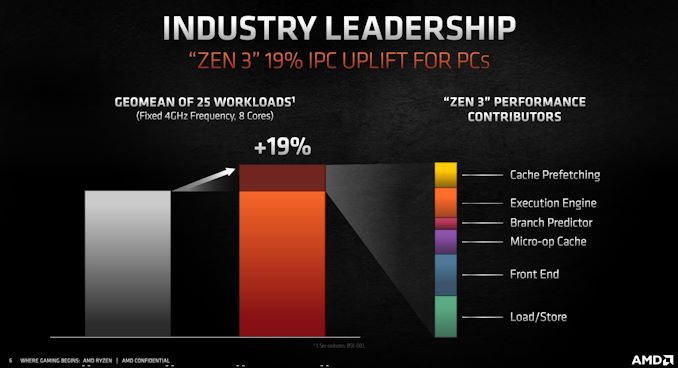


(via https://news.ycombinator.com/item?id=24720711, which we've merged hither)